Google Veo 3.1
Veo 3.1 turns a written scene into cinematic video with dialogue and sound effects already in sync. Give it a start and end image and it fills in the motion between them, or extend a clip that cuts off too soon.
Veo 3.1 Key Features
- Ingredients to video: Reference images pin down the subject before you write a word.
- Scene extension: Continue from the last frame instead of starting over.
- Frames to video: Set the opening and closing image, get the motion between.
- Character consistency: The same person, clip after clip, prompt after prompt.
- Vertical and 4K: Native 9:16, and resolution up to 4K.
- Audio in the same pass: Dialogue and effects arrive with the picture, not after.
Ingredients to Video
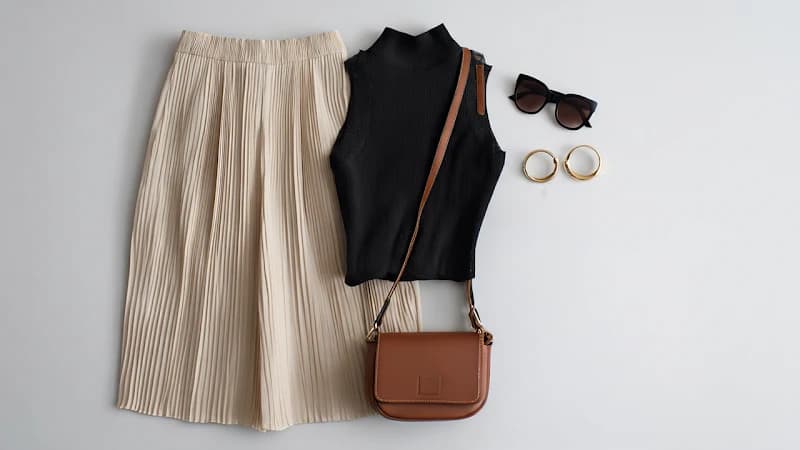
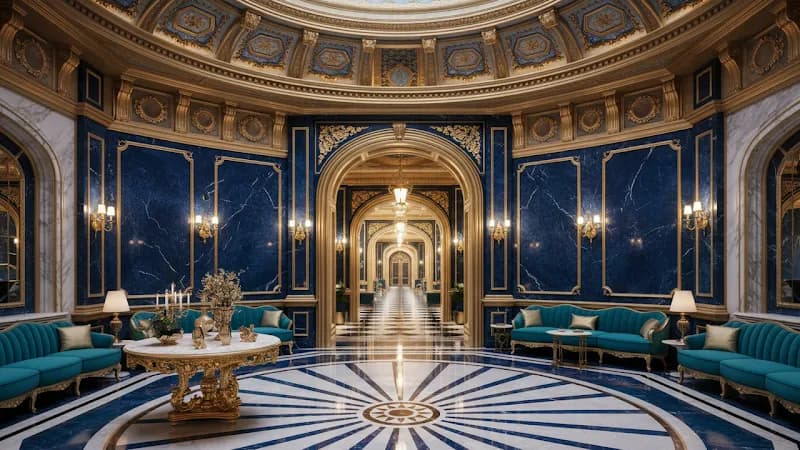
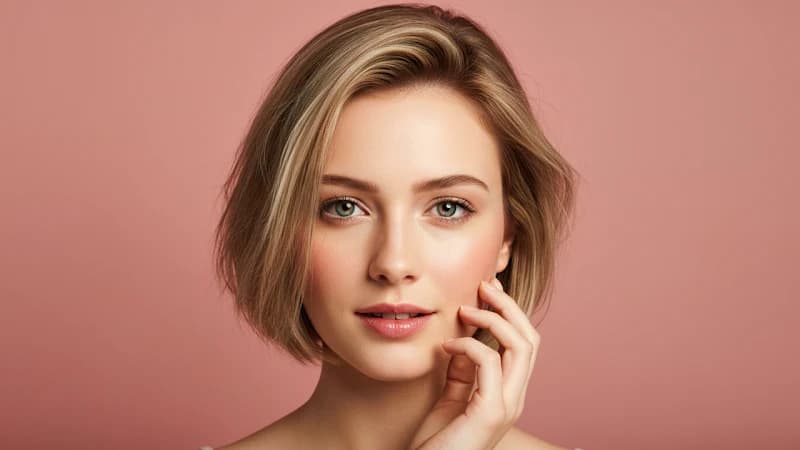
Reference images pin down the things prose is bad at: a specific face, the finish on a specific product, the exact weight of light in a room. Veo 3.1 takes up to three of them and holds what's in them steady through the clip while the prompt drives the action. Describing a color grade in words takes a sentence you'll rewrite four times; handing over a still takes one upload.
Input image 1
Input image 2
Input image 3
Prompt:
Close up shot of woman with sunglasses on top of her head, gold hood earrings, is walking in the interior, she is lost and asks where everyone is and what's going on.
Scene Extension
A single generation runs eight seconds. When the beat you needed lands at nine, the old answer was to generate the whole thing again and hope the second attempt matched. Veo 3.1 takes the last frame as its starting point and keeps going—camera still moving the way it was moving, light unchanged, audio not restarting from silence. Chain a few and you're well past the eight-second ceiling, with nothing to trim at the joins.
Input Video
Prompt 1: Graceful dancer is slowly dancing to classical music.
Prompt 2: A male dancer comes in, gracefully dancing with the woman as classical music plays.
Prompt 3: More dancers show up on the stage.
Prompt 4: The classical music continues, and the dancers continue to dance.
Output Video
Frames to Video
You already know what the opening looks like and what the closing looks like. Veo 3.1 does the part in between—the camera move, the timing, the audio underneath—and you can name the move in the prompt if you want a specific one rather than whatever the model would have chosen. Because both ends are locked to images you picked, the result drops into a timeline without trimming.

First frame

Last frame
Prompt:
Camera soars through the barn to the cowboy riding away.
Output Video
The Same Character, Clip After Clip
Bring the same person back next week, in a different setting, from a prompt that has nothing in common with the first one. Feed Veo 3.1 the reference images you used before—or a frame lifted out of a clip you already made—and the face, hair, and wardrobe come back with them. Everything else is free to change: new location, new light, new camera position, new action. Hold identity across eight or ten generations and you have a cast, which is when short clips start adding up to something.

Input image
Prompt: a monster walking toward the camera
Output video
Prompt: a cute monster dancing
Output video
Prompt: a cute monster swimming underwater
Output video
Prompt: a cute monster walking in a candy wonderland
Shoot Vertical, Finish in 4K
Veo 3.1 generates 9:16 natively instead of cropping a landscape frame down to it, so a vertical cut keeps its whole composition and nothing important gets shaved off the sides. Resolution goes up to 4K, which matters little for a story post and a lot for anything that lands on a large screen or goes through a second round of grading. Pick the shape and the size before you generate rather than fixing both afterward.
Audio That Comes Out With the Picture
Dialogue, ambience, and effects are generated alongside the frames rather than laid over them afterward, which is why a door closing sounds like it closes when it closes. Veo 3.1 extended this to the reference-image, first-and-last-frame, and extension paths too, so a clip built from stills arrives with sound instead of silent. Speech in very short fragments is still the rough edge—Google says so as well—but ambient and effect work is usually publishable as-is.
Compare Veo 3.1 video models
| Feature | Veo 3.1 | Veo 3.1 Fast | Veo 3.1 Lite |
|---|---|---|---|
| Best for | Your highest-quality, production-ready videos | Faster generation at a lower cost | Lowest-cost drafts and high-volume output |
| Input modes | Text, image & reference images | Text, image & reference images | Text & image |
| Reference images | Yes | Yes | No |
| Native audio | Built in — dialogue, effects & ambience | Built in — dialogue, effects & ambience | Built in — dialogue, effects & ambience |
| Output | Up to 4K, 4–8s clips | Up to 4K, 4–8s clips | Up to 4K, 4–8s clips |
| Visual quality | Highest | High | Good |
| Speed | Standard | Faster | Fastest |
| Relative cost | Standard | Lower | Lowest |
| Best choice when | You need the most polished, client-ready result | You want speed and savings on everyday clips | You're iterating fast or producing at volume |
GETTING STARTED
How to Generate Video with Veo 3.1
Select Veo 3.1, then set aspect ratio and resolution. Vertical is generated natively, not cropped. Or start from an image with MaxH3 image-to-video
Name the subject, the action, and the camera move. Add reference images to lock a face, product, or look.
One pass gives you eight seconds with audio. Extend from the last frame if you need more, then download the MP4.
Ready to generate your first clip?
YouTube Videos on Google Veo 3.1 AI Video Model
Veo 3.1 fully tested
AI Search
Google Veo 3.1 is INSANE - Full Tutorial
Roboverse
The New Google VEO 3.1 Tested and Explained: Create Ultra-Realistic AI Videos Fast!
AI Edge Mastery
Google Flow | Veo 3.1 Tutorial & Real Test Results
AI2Play
Master Google Veo 3.1: Mind-Blowing AI Video Results (Full Guide)
Invideo for Filmmaking
How To Use Google VEO 3.1 | Create Realistic AI Videos Step-by-step (Full Tutorial)
BIG JOHNAB
Ultimate VEO 3.1 Update EXPLAINED: How To Use Google Veo-3 For Beginners
AI Master
How I Use VEO 3.1 To Create Viral Videos In 9 Minutes
Nicky Saunders
X Posts on Google Veo 3.1 AI Video Model
Will Smith in Veo 3.1 pic.twitter.com/SuK9jky3NW
— AI Search (@aisearchio) October 15, 2025
Veo is getting a major upgrade. 🚀
— Google DeepMind (@GoogleDeepMind) October 15, 2025
We’re rolling out Veo 3.1, our updated video generation model, alongside improved creative controls for filmmakers, storytellers, and developers - many of them with audio. 🧵 pic.twitter.com/YQVRxwj7hk
Ok, Google.
— Koldo Huici (@koldo2k) October 15, 2025
Let’s put VEO 3.1 to the test.
Better prompt adherence and smoother visuals in text-to-video ⚡
Prompts 👇 pic.twitter.com/mBvgnxDDB9
The Good News:
— Alex Patrascu (@maxescu) October 15, 2025
Veo 3.1 is available in Google Flow!
The Bad News:
It's a minor, but significant upgrade pic.twitter.com/BYUxu0dAmU
Veo 3.1 + Nano Banana is insane 🤯
— PJ Ace (@PJaccetturo) October 15, 2025
Google’s new models let us make million-dollar looking ads for brands like Wander.
Copy our entire process for making this ad below 👇🧵pic.twitter.com/HL2TIzPVnY
Veo 3.1
— Tatiana Tsiguleva (@ciguleva) October 15, 2025
I2V tests.
Overall, it's really good!
I love the sounds a lot. pic.twitter.com/fyZ5bbnfSH
Meet Veo 3.1 👋
— Google AI (@GoogleAI) October 17, 2025
With Veo 3.1, you can generate videos with richer audio, better narrative control, and enhanced realism. This new update also comes with a suite of additional features built for creative control.
Including the ability to:
— Extend your videos to make them longer… pic.twitter.com/WMH9TQH0w5
Veo 3 is the state-of-the-art in video models. Veo 3.1 is our new big upgrade with enhanced realism, richer audio, scene extension, better narrative control, more precise editing capabilities & much more. Enjoy creating with it at https://t.co/QgTpxTKAOi and in the @GeminiApp ! https://t.co/kCoE8meIb6
— Demis Hassabis (@demishassabis) October 15, 2025
THE PUMPKIN MURDERERS 🎃
— Travis Davids (@MrDavids1) October 22, 2025
Veo 3.1 extend feature is actually really good! It was extended from a single frame to 43 seconds long. Besides midjourney, Google has managed to make extensions completely seamlessly without jarring visual indications when an extensions occurs. However,… pic.twitter.com/CuU5Y23yAA
Veo3.1 → Edit Feature.
— Rory Flynn (@Ror_Fly) October 15, 2025
Tested it with a more complex visual.
Some misses...but still impressive.
PROCESS:
1. Generate Initial Video
2. Select the "pencil" icon.
3. Add edits + generate.
INITIAL PROMPT:
A silver-haired woman dances with precision and intensity inside a dimly… pic.twitter.com/yfZr4VhNAc
Today, Veo 3.1 Ingredients to Video is getting more expressive + portrait mode has arrived (we heard you!)
— Sundar Pichai (@sundarpichai) January 13, 2026
You can now create vertical clips with livelier movement and better control directly in the @Geminiapp, @YouTube & Google Vids.
All this plus state-of-the-art upscaling to… pic.twitter.com/vCvGEelldS
Google DeepMind Veo 3.1 is something else, social media is cooked forever.
— AshutoshShrivastava (@ai_for_success) October 9, 2025
This video is claimed to be created using Veo 3.1, and I’m adding a screenshot in the comments as proof.
Veo 3.1 generates 8-second videos by default, supports both 9:16 and 16:9 formats, and delivers… https://t.co/mknPB43VXf pic.twitter.com/GPfIBmZQhe
Google has updated its Veo 3.1 AI video model with a stronger Ingredients to Video workflow.
— Rohan Paul (@rohanpaul_ai) January 13, 2026
Ingredients just means the input “parts” you give the model up front, usually a subject image, a background image, and a style or look reference.
Veo uses those images as anchors while… https://t.co/PIJeGNj3Tp pic.twitter.com/yN5uZGlbiE
Tested @FlowbyGoogle's Veo 3.1 + new controls: game-changer!
— SD | AI Animation Storyteller (@SDXLHQ) November 6, 2025
From "prompt-and-pray" to interactive director suite. Insane accuracy & detail. Ends random generations; build scenes layer-by-layer like an editor.
All UI features in demo video attached👇#veo31 #GoogleAI #AIart pic.twitter.com/Zhd8j2pA5n
🥵Google's VEO 3.1 video generation model is set for imminent release on Gemini and Vertex AI! 🎬 Get ready for:
— Times Of Cinema (@Times_of_Cinema) October 15, 2025
🔹 Longer clips (potential 30 seconds!)
🔹 Refined audio-visual quality
This launch is poised to significantly advance generative media for creators and enterprise… pic.twitter.com/hFfPRa3cFv
The Official Release has finally dropped! Veo-3.1 is here!
— Theoretically Media (@TheoMediaAI) October 15, 2025
After a week of biting my tongue at the "leaked specs" we can finally start putting this update through it's paces!
3.1's video model enhancements are one thing, but the real sauce here is in the new features!
(more) pic.twitter.com/Yo8Ke3fKA4
Updates to Veo 3.1 📹 in the Gemini API and AI Studio:
— Logan Kilpatrick (@OfficialLoganK) January 13, 2026
- We now support upsampling to 1080p and 4K
- Improved ingredients (image reference) to video consistency
- Vertical video support for ingredients to video
So much Veo progress in the last few months, lots to build : )
We’re setting a new standard for AI video creation at work.
— Google Workspace (@GoogleWorkspace) October 15, 2025
The new Veo 3.1 model in Google Vids gives you higher quality videos with richer audio, more narrative control, & enhanced realism — helping you produce videos that tell your story beautifully. https://t.co/de2POcj4sQ
Exclusive: First real samples of Veo 3.1 generated videos - TestingCatalog https://t.co/xk1sxzsG4h
— audai (@audaiuk) October 11, 2025
Google's Veo-3.1 revolutionizes AI video with precise frame controls and ingredient blending. Tip: Use "ingredients" in prompts like "Combine [char img] with [loc] for dynamic scenes." https://t.co/0atztXSU5n #AIVideo #NewAIModels #GlobalAI
— PromptNinja (@ninja_prompt) October 16, 2025
FAQs
Try Veo 3.1 on MaxH3
Free credits, no card required. Reference images, first-and-last-frame control, and audio that comes out with the picture—all in one place.
Free generations come watermarked. Upgrade to export clean.