Happy Horse 1.1 AI Video Generator
Alibaba's Happy Horse 1.1 on MaxH3 makes 3–15 second clips that come with their own sound: lip-synced dialogue, effects and ambience, from text, a first frame or up to 9 reference images, at 720p or 1080p.
Key Features of Happy Horse 1.1 AI Video Model
- Native Audio, Generated With the Picture: Dialogue, sound effects and ambience come out in the same clip, already in sync.
- Dialogue With Matching Lip-Sync: Put the spoken line in quotes; the mouth, expression and gestures follow it.
- Image to Video That Keeps Your Product: Start from your own photo; shape, details and materials stay as they were.
- The Same Character From a Reference Image: Upload up to 9 reference images and put the character in a new scene.
- Fast Motion That Holds Its Shape: Tracking shots of moving subjects without warping or flicker.
- Direct the Camera With Words: Dolly-ins, tracking shots and push-ins, written into the prompt.
Native Audio, Generated With the Picture
Describe the sounds along with the scene and Happy Horse 1.1 renders them together. In this clip the charcoal flares and crackles, the night-market crowd murmurs and the vendor calls out his line, all in one 5-second take with nothing to line up afterwards.
A street-food vendor at a busy night market flips sizzling skewers over a charcoal grill; flames flare, oil crackles and spits, a crowd murmurs behind him, and he calls out with a grin: "Fresh off the grill!" Warm string lights, handheld documentary feel, with all of these sounds in sync with the picture.
Dialogue With Matching Lip-Sync
Write the line in quotes and say who speaks it. Here a travel host speaks Mandarin Chinese to the camera and her lips, expression and hands follow every word; English lines sync the same way. Keep each line short enough to fit the clip length you pick.
A young female travel host stands on a city rooftop at golden hour and speaks directly to the camera in Mandarin Chinese, with natural mouth movements matching every word: "大家好,今天带你们去看这座城市最美的日落。" Gentle wind in her hair, soft city ambience, medium close-up.
Image to Video That Keeps Your Product
Upload a product shot as the first frame and describe the motion. A still of a green-dial watch becomes a slow quarter turn under a sweeping light, and the dial, hands, hour markers, steel case and leather strap stay as they were in the photo. Image-to-video clips take their aspect ratio from the image you upload.
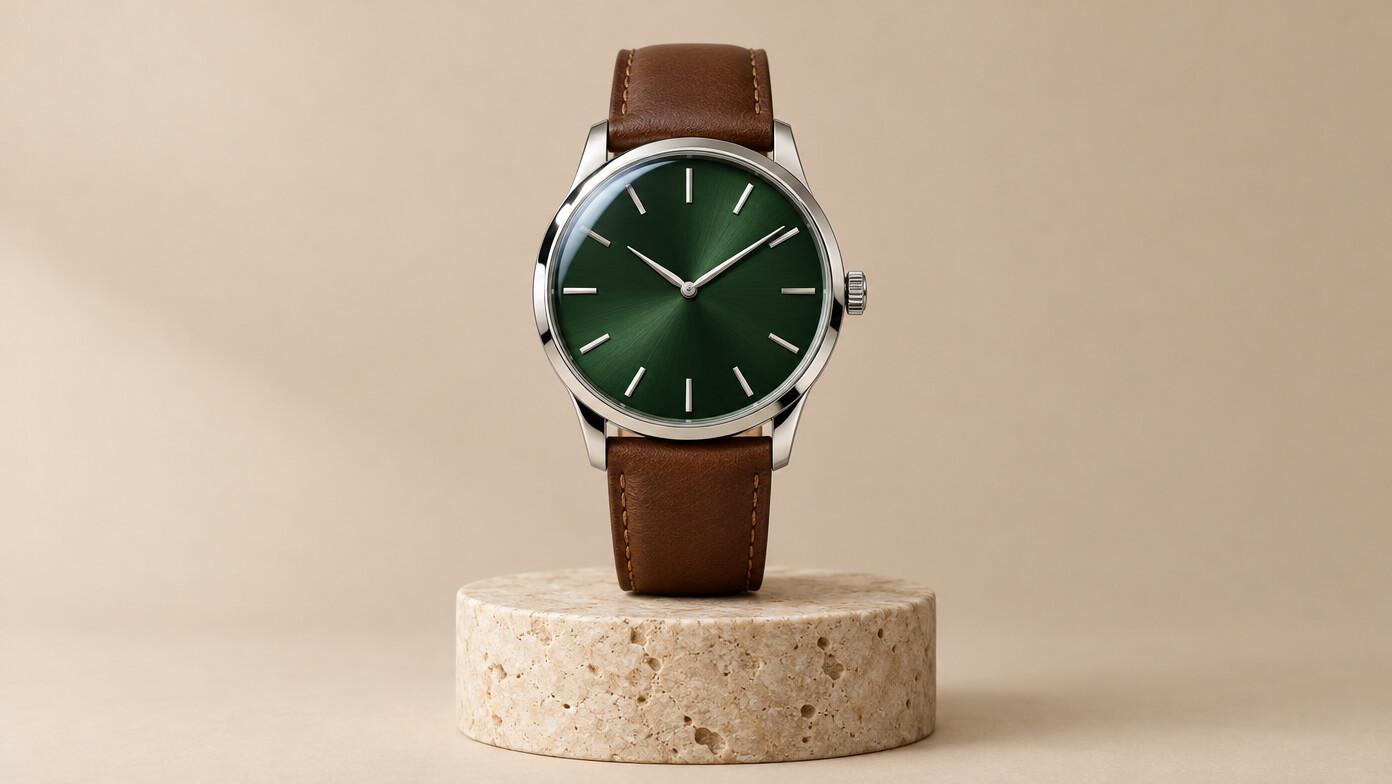
The wristwatch slowly turns a quarter turn on the stone plinth while a soft light sweep glides across the green sunburst dial and polished steel case. Keep the dial, hands, hour markers, case and leather strap exactly as in the image. Subtle mechanical ticking, calm studio atmosphere.
The Same Character From a Reference Image
Give Happy Horse 1.1 one or more reference images, up to nine, and cite them in the prompt as [Image 1], [Image 2] and so on. From a single studio portrait, the woman here keeps her silver bob, round glasses, mustard raincoat and striped sweater as she cycles along a rainy canal street at dusk.

The woman from [Image 1], with the same face, short silver bob, round tortoiseshell glasses, mustard-yellow raincoat and striped sweater, rides a bicycle along a rainy canal street at dusk, neon signs reflecting on the wet cobblestones; the camera tracks beside her, then she glances at the lens and smiles. Rain and bicycle bell sounds.
Fast Motion That Holds Its Shape
A vintage sports car takes a sweeping mountain curve while the camera tracks alongside at the same speed: the body, wheels and chrome stay rigid, and the sea and cliffs slide past smoothly behind it. Describe the camera move as well as the subject's motion.
A dark green vintage sports car takes a sweeping curve on a coastal mountain road at sunset; the camera tracks smoothly alongside at the same speed, the car's body, wheels and chrome trim stay crisp and rigid through the turn while the sea and cliffs slide past behind it. Engine roar and tyre hum.
Direct the Camera With Words
Write the camera move into the prompt and Happy Horse 1.1 stages it. The shot starts at the back of a jazz club, glides past the candlelit tables and ends close on the saxophone keys as she plays, with the music in the clip too.
A slow dolly-in from the back of a dim jazz club: past silhouetted tables and soft haze, toward a saxophonist on a small stage under a single warm spotlight, ending on a close-up of the saxophone keys as she plays a soulful phrase. Saxophone music and quiet room tone.
Use Cases for Happy Horse 1.1
Short clips that need sound from the first frame.
Ads With Voice and Sound
Product spots and promos where the line, the sound effects and the music arrive with the picture.
Product Videos From Photos
Turn an existing product shot into a turntable, reveal or close-up without reshooting it.
Talking-Head Social Clips
Hosts, presenters and characters speaking to camera in English or Chinese, with matching lip movement.
Story Scenes and Trailers
Directed shots with a recurring character, for pitches, trailers and short narrative clips.
What Makes Happy Horse 1.1 Stand Out
- Sound in the same pass: Dialogue, effects and ambience are generated with the video, so a clip is usable as soon as it renders.
- Subjects that stay themselves: A first frame or up to nine reference images keep a product or character recognisable from shot to shot.
- Any length from 3 to 15 seconds: Pick the duration in one-second steps, at 720p or 1080p, in 16:9, 9:16, 4:3, 3:4 or 1:1.

How to Use Happy Horse 1.1 on MaxH3
Open Happy Horse 1.1
Happy Horse 1.1 is already selected in the generator above. Choose text to video, image to video or reference to video.
Describe the Scene and the Sound
Write what happens, how the camera moves and any dialogue in quotes. Add a first frame or reference images if you are using them.
Generate and Download
Pick 3 to 15 seconds, 720p or 1080p and an aspect ratio, then press the arrow. The clip opens in your workspace, ready to download as an MP4.
More AI Video Models on MaxH3
FAQs
Create Videos With Sound Using Happy Horse 1.1
Describe the scene and what it sounds like, or start from a photo or a character, and get a 3–15 second clip on any paid plan.