Video Upscaler

Upscale Your Videos for Greater Impact on Any Screen
Drag the slider: on one side, a 640×360 clip of a snow leopard; on the other, the same clip after a 4x upscale with Topaz Enhance on MaxH3, shown here at 1080p. Fur, whiskers and falling snow come back into focus without changing the shot.

Make Videos More Watchable
Low-resolution clips look soft on large, sharp screens. Upscaling gives them the pixels to hold up at 1080p, 2K and 4K.
Keep Important Details Clear
Faces, fur, fabric and edges are rebuilt rather than just stretched, so the detail people look for stays readable.
Spend Less Time Fixing
Pick a scale and a mode and the upscale runs in the cloud. Our 5-second test clips came back in 20 to 50 seconds.
Bring Faces Back Into Focus
Face mode (Topaz Iris) is tuned for people. We shrank a close-up of an elderly man reading a letter to 360p and upscaled it 4x: his wrinkles, eyes and the handwriting on the page are sharp again, and his expression is unchanged.

Reduce Noise and Grain
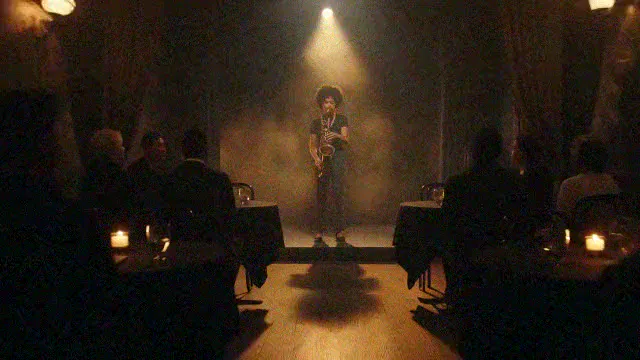
Denoise mode (Topaz Nyx) cleans up grainy low-light footage. We added heavy noise to a dim jazz-club shot; the 2x result removes it while keeping the smoky haze and the stage light. Denoise runs at up to 2x.
Sharpen Soft or Blurry Footage
Sharpen mode (Topaz Artemis) recovers edges in soft footage. On a blurred, low-resolution city skyline, the building outlines, windows and street lights come back at 4x.

Keep Your Original Style Intact
Anime mode (Topaz Gaia CG) is built for animation and CG. A 360p anime clip upscaled 4x keeps its clean line art and flat colors, with no painterly texture added.

See What You Can Do With Our Video Upscaler
Give older, smaller or softer clips a second life.
Make Every Upload Worth Watching
Bring phone clips and older footage up to the resolution of the rest of your edit.
Help Buyers See Every Detail
Upscale product videos so textures, stitching and finishes read clearly on large screens.
Give Every Release More Visual Impact
Deliver trailers, music videos and ads at the resolution your platform expects.
Make Every Explanation Easier to Follow
Sharpen lecture and tutorial footage so speakers and on-screen material look crisp.

How to Upscale a Video With MaxH3
Upload Your Video
Add an MP4 or MOV file up to 200 MB in the Video Upscaler above.
Choose a Scale and a Mode
Pick 2x, 4x, HD or 4K, then Standard, Face, Denoise, Sharpen or Anime mode. The credit cost shows before you start.
Upscale and Download
Press Create. When the upscale finishes, download the MP4 from your workspace, with the original audio kept.
FAQs

Give Your Footage a Sharper Second Life
Upload a clip, choose a scale and a mode, and get a cleaner, higher-resolution video, usually in about a minute.