Grok Imagine Video 1.5 AI Video Generator
xAI's Grok Imagine Video 1.5 on MaxH3 turns a prompt or a still image into 1–15 second clips with synchronized sound, at 480p, 720p or 1080p, and free credits cover it.
Key Features of Grok Imagine Video 1.5
- Image-to-Video Generation: Bring a still to life while keeping its composition and light.
- Native Synchronized Audio: Whistles, footsteps and voices generated with the picture.
- Cinematic Motion and Physics: Fabric, water and wind that move the way they should.
- Fast Generation: A 5-second 720p clip in about a minute.
- Clips Up to 15 Seconds: Pick any length from 1 to 15 seconds for one continuous shot.
Image-to-Video Generation
Upload a photo and describe the motion. This blue-hour lighthouse shot becomes a slow push-in with waves breaking over the rocks and the beam sweeping through the clouds, while the framing and colours of the original stay put.
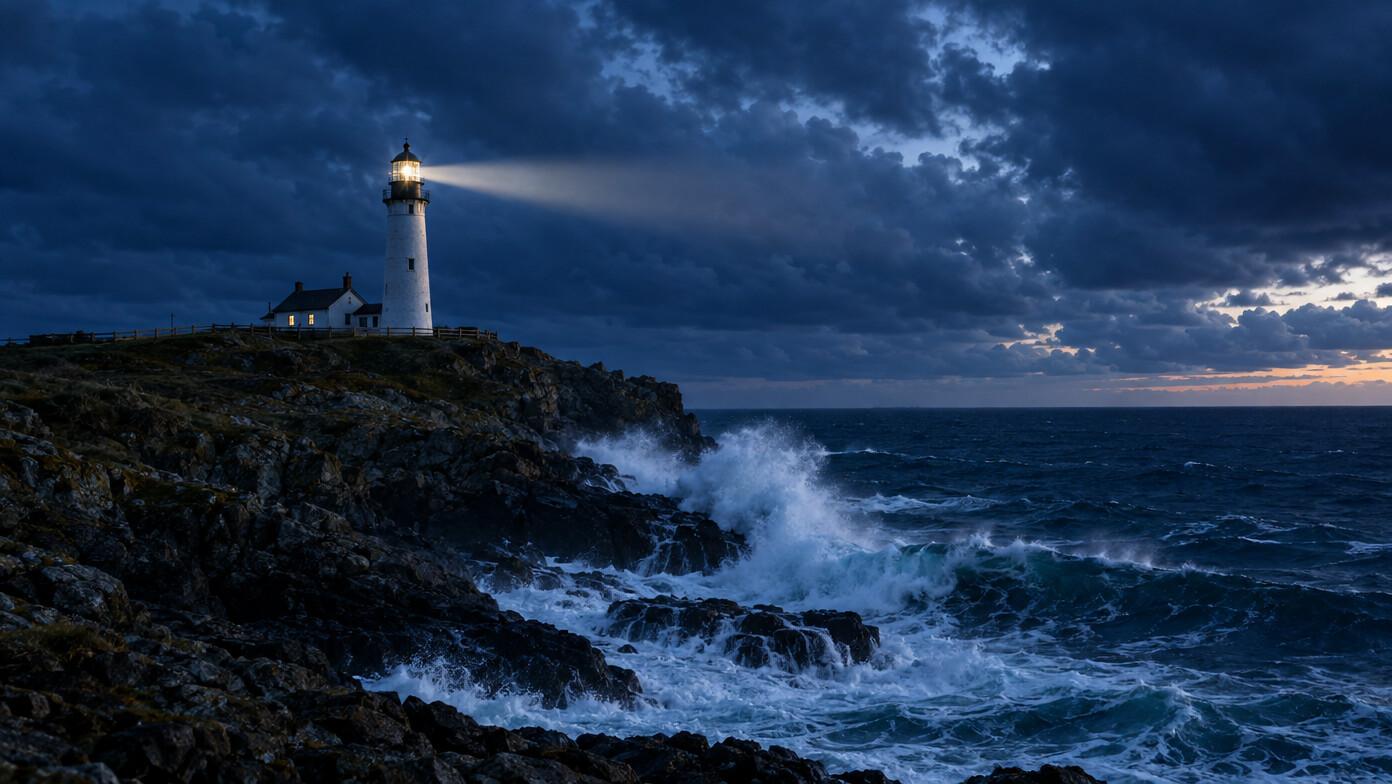
Slow cinematic push-in toward the lighthouse as big waves crash against the rocks and spray drifts across the frame, the beam sweeping through the low clouds. Roaring surf and gusting wind.
Native Synchronized Audio
Describe what the scene sounds like and the clip arrives with it. Here a steam train pulls out with its whistle, hissing pistons and clattering wheels while the conductor calls out, all in sync with the picture.
A vintage steam train pulls out of a small mountain station: the whistle blows, pistons hiss, wheels clatter over the rail joints, and the conductor on the platform waves and calls "All aboard!" Puffs of white steam in golden afternoon light.
Cinematic Motion and Physics
A red silk scarf catches a gust on a sea cliff, ripples and twists, then slips free and drifts out over the waves with the sun shining through it. Describe the force acting on the subject and the camera move, and Grok Imagine Video 1.5 plays it out.
A long red silk scarf is caught by a strong gust on a windy sea cliff, rippling, twisting and snapping in the air before it slips free and tumbles away over the waves; the camera follows it in slow motion, late-afternoon sun shining through the fabric. Wind roaring and fabric flapping.
Fast Generation
In our tests, 5-second clips at 720p were ready in 52 to 83 seconds, like this hummingbird darting between red flowers. That is quick enough to try a few versions of an idea in one sitting.
A hummingbird hovers in front of a red trumpet flower in a sunlit garden, wings a blur, then darts away; shallow depth of field, bright summer light. The buzz of its wings and birdsong.
Clips Up to 15 Seconds
Choose the duration in one-second steps, from a 1-second loop to a 15-second take. This continuous aerial glides over misty rice terraces at sunrise and follows the river all the way down to a village.
One continuous aerial shot gliding low over misty rice terraces at sunrise, following a winding river down the valley toward a small village with wooden houses and rising cooking smoke. Gentle wind and distant birds.
Who Grok Imagine Video 1.5 Is For
Quick, sound-on clips without a long wait.
Social Creators
Turn an idea or a photo into a short clip with sound for reels and stories.
Photographers
Add motion to stills: water, sky, light and a slow camera move.
Marketers
Draft moving versions of ad concepts in a minute and iterate before you produce.
Anyone Starting Out
Free credits cover it, so it is an easy first model for learning AI video.
Grok Imagine Video 1.5 vs Veo 3.1 vs Kling 3.0
| Feature | Grok Imagine Video 1.5 | Veo 3.1 | Kling 3.0 |
|---|---|---|---|
| Developer | xAI | Kuaishou | |
| Inputs | Text, first frame | Text, first frame, up to 3 reference images | Text, first frame |
| Resolution | 480p, 720p, 1080p | 720p, 1080p, 4K | 720p, 1080p, 4K |
| Clip length | 1–15 s | 4–8 s | 3–15 s |
| Aspect ratios | 16:9, 9:16, 3:2, 2:3, 1:1 | 16:9, 9:16 | 16:9, 9:16, 1:1 |
| Audio | Native | Native | Native |
| Who can use it | Free and paid plans | Paid plans | Free and paid plans |
Specs and access as offered on MaxH3.
What Makes Grok Imagine Video 1.5 Stand Out
- Any length from 1 to 15 seconds: Short loops and long takes from the same model, in five aspect ratios including 2:3 and 3:2.
- Sound comes with it: Every clip carries audio generated alongside the picture, from ambience to spoken lines.
- Open to free credits: You can try it without a subscription, using free credits.

How to Use Grok Imagine Video 1.5 on MaxH3
Open Grok Imagine Video 1.5
Grok Imagine Video 1.5 is already selected in the generator above. Choose text to video, or image to video to start from a still.
Describe the Scene and the Sound
Write what happens, how the camera moves and any dialogue in quotes. Add a first frame if you are starting from an image.
Generate and Download
Pick 1 to 15 seconds, 480p, 720p or 1080p and an aspect ratio, then press the arrow. The clip opens in your workspace, ready to download as an MP4.
More AI Video Models on MaxH3
FAQs
Experience Fast, Sound-On Video With Grok Imagine Video 1.5
Start from a prompt or a photo and get a 1–15 second clip with sound in about a minute, on free credits.