Google Veo 3.1
Veo 3.1 把寫下來的場面變成電影感的影片,對白和音效已經對好了。給它一張開始圖和一張結束圖,它會把中間的運動補上;片子結束得太早,也可以接著往下延。
Veo 3.1 的核心能力
素材轉影片
參考圖能定住文字最不擅長的那些東西:一張具體的臉、某個產品的具體質感、一個房間裡光線的確切分量。Veo 3.1 最多收三張,在提示詞推動情節的同時,把圖裡的內容整條片子穩住。用文字描述一套調色,得寫一句你會改四遍的話;遞一張靜格過去,只要上傳一次。
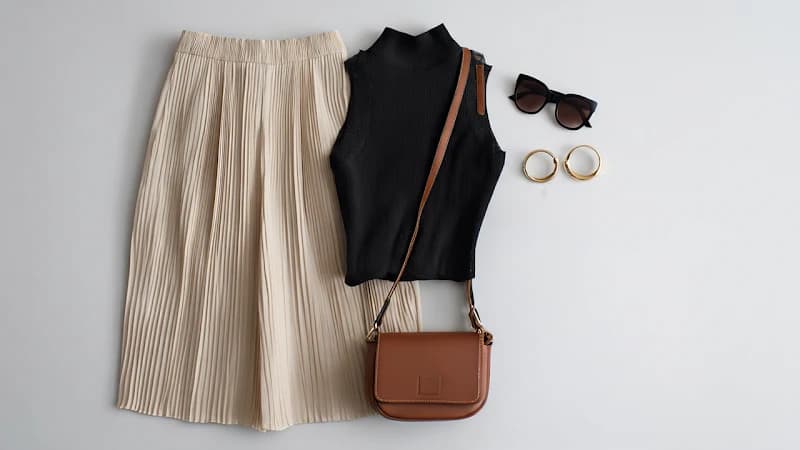
輸入圖片 1
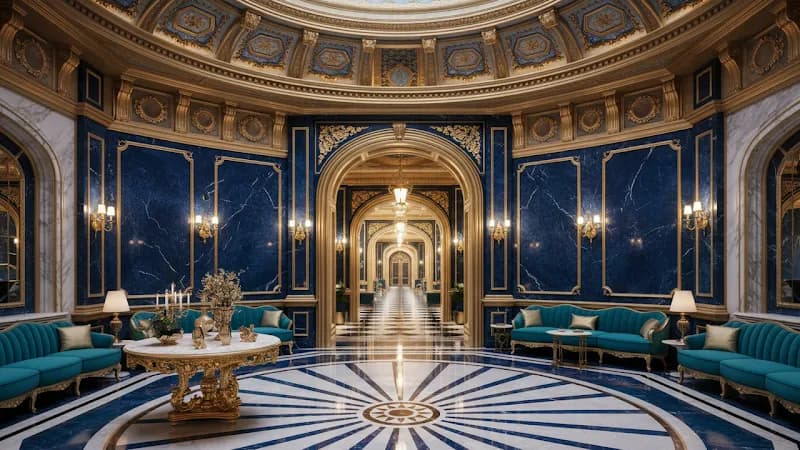
輸入圖片 2
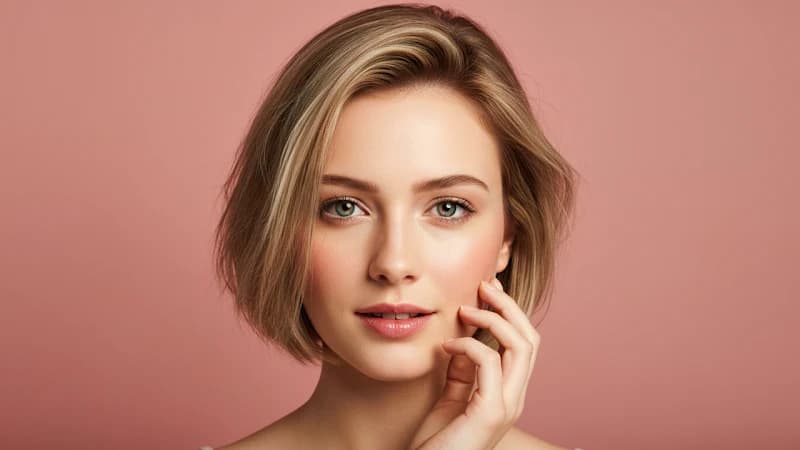
輸入圖片 3
Prompt:
Close up shot of woman with sunglasses on top of her head, gold hood earrings, is walking in the interior, she is lost and asks where everyone is and what's going on.
場景延長
一次生成跑八秒。當你要的那個點落在第九秒時,過去的辦法是整條重新生成,然後祈禱第二次能對上。Veo 3.1 拿最後一格當起點繼續往下走——鏡頭還按原來的方式在動,光沒變,聲音也不會從靜音重新開始。串幾段下來,你就遠遠越過了八秒的天花板,而且接縫處不用剪掉任何東西。
輸入影片
Prompt 1: Graceful dancer is slowly dancing to classical music.
Prompt 2: A male dancer comes in, gracefully dancing with the woman as classical music plays.
Prompt 3: More dancers show up on the stage.
Prompt 4: The classical music continues, and the dancers continue to dance.
輸出影片
影格轉影片
開場長什麼樣、收尾長什麼樣,你已經知道了。Veo 3.1 負責中間那段——運鏡、節奏、底下墊的聲音。如果你想要某個特定的運鏡,而不是模型自己挑的那個,在提示詞裡點名就行。因為兩端都鎖在你自己選的圖上,結果拖進時間軸時不用再修剪。

首格

尾格
Prompt:
Camera soars through the barn to the cowboy riding away.
輸出影片
同一個角色,一條接一條
下週換個場景,用一條跟上次毫無共同點的提示詞,把同一個人再叫回來。把上次用過的參考圖交給 Veo 3.1——或者從已經做好的片子裡抽一格——臉、髮型和服裝就會一起回來。其餘部分隨便變:新地點、新光線、新機位、新動作。能在八次、十次生成之間守住同一個身分,你手上就有了一組「演員」,短片段也是從這時候開始能攢成一個東西的。
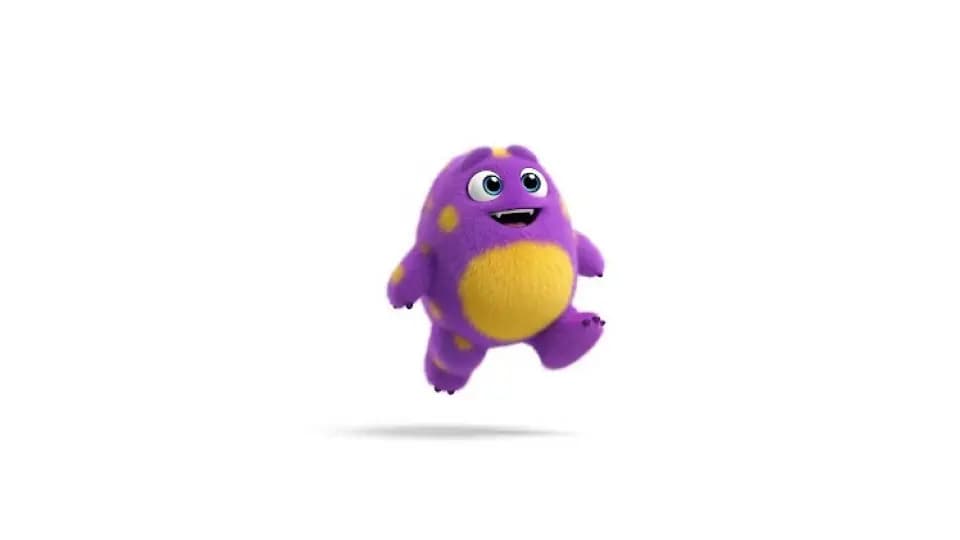
輸入圖片
Prompt: a monster walking toward the camera
輸出影片
Prompt: a cute monster dancing
輸出影片
Prompt: a cute monster swimming underwater
輸出影片
Prompt: a cute monster walking in a candy wonderland
直著拍,用 4K 交付
Veo 3.1 是原生生成 9:16,而不是把橫式裁下來,所以直式版能完整保住構圖,兩側不會削掉重要的東西。解析度最高到 4K——發個限時動態沒什麼差別,但只要片子要上大螢幕,或者還要再過一遍調色,差別就很大。與其事後補救,不如在生成前就把畫幅和尺寸定下來。
跟畫面一起出來的聲音
對白、環境聲和音效是跟畫面一起生成的,不是事後鋪上去的——所以門關上的時候,聽起來就是那一刻關上的。Veo 3.1 把這一點也鋪到了參考圖、首尾格和延長這幾條路徑上,所以用靜格搭出來的片子拿回來是帶聲音的,不是啞的。極短片段裡的說話仍然是粗糙的地方——Google 自己也這麼說——但環境聲和音效通常可以直接拿去用。
比較 Veo 3.1 系列影片模型
| 項目 | Veo 3.1 | Veo 3.1 Fast | Veo 3.1 Lite |
|---|---|---|---|
| 適合場景 | 畫質最高、可直接交付的成片 | 更快的生成,更低的成本 | 成本最低的草稿和大批量出片 |
| 輸入方式 | 文字、圖片和參考圖 | 文字、圖片和參考圖 | 文字和圖片 |
| 參考圖 | 支援 | 支援 | 不支援 |
| 原生聲音 | 內建——對白、音效和環境聲 | 內建——對白、音效和環境聲 | 內建——對白、音效和環境聲 |
| 輸出 | 最高 4K,4–8 秒片段 | 最高 4K,4–8 秒片段 | 最高 4K,4–8 秒片段 |
| 畫面品質 | 最高 | 高 | 良好 |
| 速度 | 標準 | 更快 | 最快 |
| 相對成本 | 標準 | 更低 | 最低 |
| 什麼時候選它 | 需要最精細、能直接給客戶看的結果 | 日常片子想要速度和省錢 | 在快速試錯,或者在批量出片 |
開始使用
怎麼用 Veo 3.1 生成影片
寫清楚主體、動作和運鏡。想鎖住一張臉、一件產品或者一套質感,就加參考圖。
一次生成給你八秒帶聲音的片子。不夠就從最後一格往下延,然後下載 MP4。
準備好生成第一條片子了嗎?
YouTube 上關於 AI 影片模型 Google Veo 3.1 的影片
Veo 3.1 fully tested
AI Search
Google Veo 3.1 is INSANE - Full Tutorial
Roboverse
The New Google VEO 3.1 Tested and Explained: Create Ultra-Realistic AI Videos Fast!
AI Edge Mastery
Google Flow | Veo 3.1 Tutorial & Real Test Results
AI2Play
Master Google Veo 3.1: Mind-Blowing AI Video Results (Full Guide)
Invideo for Filmmaking
How To Use Google VEO 3.1 | Create Realistic AI Videos Step-by-step (Full Tutorial)
BIG JOHNAB
Ultimate VEO 3.1 Update EXPLAINED: How To Use Google Veo-3 For Beginners
AI Master
How I Use VEO 3.1 To Create Viral Videos In 9 Minutes
Nicky Saunders
X 上關於 AI 影片模型 Google Veo 3.1 的貼文
Will Smith in Veo 3.1 pic.twitter.com/SuK9jky3NW
— AI Search (@aisearchio) October 15, 2025
Veo is getting a major upgrade. 🚀
— Google DeepMind (@GoogleDeepMind) October 15, 2025
We’re rolling out Veo 3.1, our updated video generation model, alongside improved creative controls for filmmakers, storytellers, and developers - many of them with audio. 🧵 pic.twitter.com/YQVRxwj7hk
Ok, Google.
— Koldo Huici (@koldo2k) October 15, 2025
Let’s put VEO 3.1 to the test.
Better prompt adherence and smoother visuals in text-to-video ⚡
Prompts 👇 pic.twitter.com/mBvgnxDDB9
The Good News:
— Alex Patrascu (@maxescu) October 15, 2025
Veo 3.1 is available in Google Flow!
The Bad News:
It's a minor, but significant upgrade pic.twitter.com/BYUxu0dAmU
Veo 3.1 + Nano Banana is insane 🤯
— PJ Ace (@PJaccetturo) October 15, 2025
Google’s new models let us make million-dollar looking ads for brands like Wander.
Copy our entire process for making this ad below 👇🧵pic.twitter.com/HL2TIzPVnY
Veo 3.1
— Tatiana Tsiguleva (@ciguleva) October 15, 2025
I2V tests.
Overall, it's really good!
I love the sounds a lot. pic.twitter.com/fyZ5bbnfSH
Meet Veo 3.1 👋
— Google AI (@GoogleAI) October 17, 2025
With Veo 3.1, you can generate videos with richer audio, better narrative control, and enhanced realism. This new update also comes with a suite of additional features built for creative control.
Including the ability to:
— Extend your videos to make them longer… pic.twitter.com/WMH9TQH0w5
Veo 3 is the state-of-the-art in video models. Veo 3.1 is our new big upgrade with enhanced realism, richer audio, scene extension, better narrative control, more precise editing capabilities & much more. Enjoy creating with it at https://t.co/QgTpxTKAOi and in the @GeminiApp ! https://t.co/kCoE8meIb6
— Demis Hassabis (@demishassabis) October 15, 2025
THE PUMPKIN MURDERERS 🎃
— Travis Davids (@MrDavids1) October 22, 2025
Veo 3.1 extend feature is actually really good! It was extended from a single frame to 43 seconds long. Besides midjourney, Google has managed to make extensions completely seamlessly without jarring visual indications when an extensions occurs. However,… pic.twitter.com/CuU5Y23yAA
Veo3.1 → Edit Feature.
— Rory Flynn (@Ror_Fly) October 15, 2025
Tested it with a more complex visual.
Some misses...but still impressive.
PROCESS:
1. Generate Initial Video
2. Select the "pencil" icon.
3. Add edits + generate.
INITIAL PROMPT:
A silver-haired woman dances with precision and intensity inside a dimly… pic.twitter.com/yfZr4VhNAc
Today, Veo 3.1 Ingredients to Video is getting more expressive + portrait mode has arrived (we heard you!)
— Sundar Pichai (@sundarpichai) January 13, 2026
You can now create vertical clips with livelier movement and better control directly in the @Geminiapp, @YouTube & Google Vids.
All this plus state-of-the-art upscaling to… pic.twitter.com/vCvGEelldS
Google DeepMind Veo 3.1 is something else, social media is cooked forever.
— AshutoshShrivastava (@ai_for_success) October 9, 2025
This video is claimed to be created using Veo 3.1, and I’m adding a screenshot in the comments as proof.
Veo 3.1 generates 8-second videos by default, supports both 9:16 and 16:9 formats, and delivers… https://t.co/mknPB43VXf pic.twitter.com/GPfIBmZQhe
Google has updated its Veo 3.1 AI video model with a stronger Ingredients to Video workflow.
— Rohan Paul (@rohanpaul_ai) January 13, 2026
Ingredients just means the input “parts” you give the model up front, usually a subject image, a background image, and a style or look reference.
Veo uses those images as anchors while… https://t.co/PIJeGNj3Tp pic.twitter.com/yN5uZGlbiE
Tested @FlowbyGoogle's Veo 3.1 + new controls: game-changer!
— SD | AI Animation Storyteller (@SDXLHQ) November 6, 2025
From "prompt-and-pray" to interactive director suite. Insane accuracy & detail. Ends random generations; build scenes layer-by-layer like an editor.
All UI features in demo video attached👇#veo31 #GoogleAI #AIart pic.twitter.com/Zhd8j2pA5n
🥵Google's VEO 3.1 video generation model is set for imminent release on Gemini and Vertex AI! 🎬 Get ready for:
— Times Of Cinema (@Times_of_Cinema) October 15, 2025
🔹 Longer clips (potential 30 seconds!)
🔹 Refined audio-visual quality
This launch is poised to significantly advance generative media for creators and enterprise… pic.twitter.com/hFfPRa3cFv
The Official Release has finally dropped! Veo-3.1 is here!
— Theoretically Media (@TheoMediaAI) October 15, 2025
After a week of biting my tongue at the "leaked specs" we can finally start putting this update through it's paces!
3.1's video model enhancements are one thing, but the real sauce here is in the new features!
(more) pic.twitter.com/Yo8Ke3fKA4
Updates to Veo 3.1 📹 in the Gemini API and AI Studio:
— Logan Kilpatrick (@OfficialLoganK) January 13, 2026
- We now support upsampling to 1080p and 4K
- Improved ingredients (image reference) to video consistency
- Vertical video support for ingredients to video
So much Veo progress in the last few months, lots to build : )
We’re setting a new standard for AI video creation at work.
— Google Workspace (@GoogleWorkspace) October 15, 2025
The new Veo 3.1 model in Google Vids gives you higher quality videos with richer audio, more narrative control, & enhanced realism — helping you produce videos that tell your story beautifully. https://t.co/de2POcj4sQ
Exclusive: First real samples of Veo 3.1 generated videos - TestingCatalog https://t.co/xk1sxzsG4h
— audai (@audaiuk) October 11, 2025
Google's Veo-3.1 revolutionizes AI video with precise frame controls and ingredient blending. Tip: Use "ingredients" in prompts like "Combine [char img] with [loc] for dynamic scenes." https://t.co/0atztXSU5n #AIVideo #NewAIModels #GlobalAI
— PromptNinja (@ninja_prompt) October 16, 2025
常見問題
在 MaxH3 上試用 Veo 3.1
免費點數,無需綁卡。參考圖、首尾格控制,以及跟畫面一起出來的聲音——全在同一個地方。
免費生成的片子帶浮水印。升級後可以乾淨匯出。