Grok Imagine Video 1.5 AI 影片產生器
MaxH3 上的 xAI Grok Imagine Video 1.5 能把一則提示詞或一張靜態圖變成 1–15 秒、聲畫同步的片段,支援 480p、720p 或 1080p,用免費點數就能生成。

Grok Imagine Video 1.5 的主要功能
- 圖生影片: 讓靜態圖動起來,同時保留原本的構圖和光線。
- 原生同步聲音: 汽笛、腳步和人聲與畫面一起生成。
- 電影級動態與物理效果: 布料、水和風,都照應有的方式運動。
- 快速生成: 5 秒 720p 片段大約一分鐘出片。
- 最長 15 秒的片段: 1 到 15 秒任選,拍成一個連續鏡頭。
圖生影片
上傳一張照片並描述動作。這張藍調時刻的燈塔照片變成一個緩慢推近的鏡頭:海浪拍打礁石,光束掃過雲層,而原圖的構圖和色彩都維持不變。
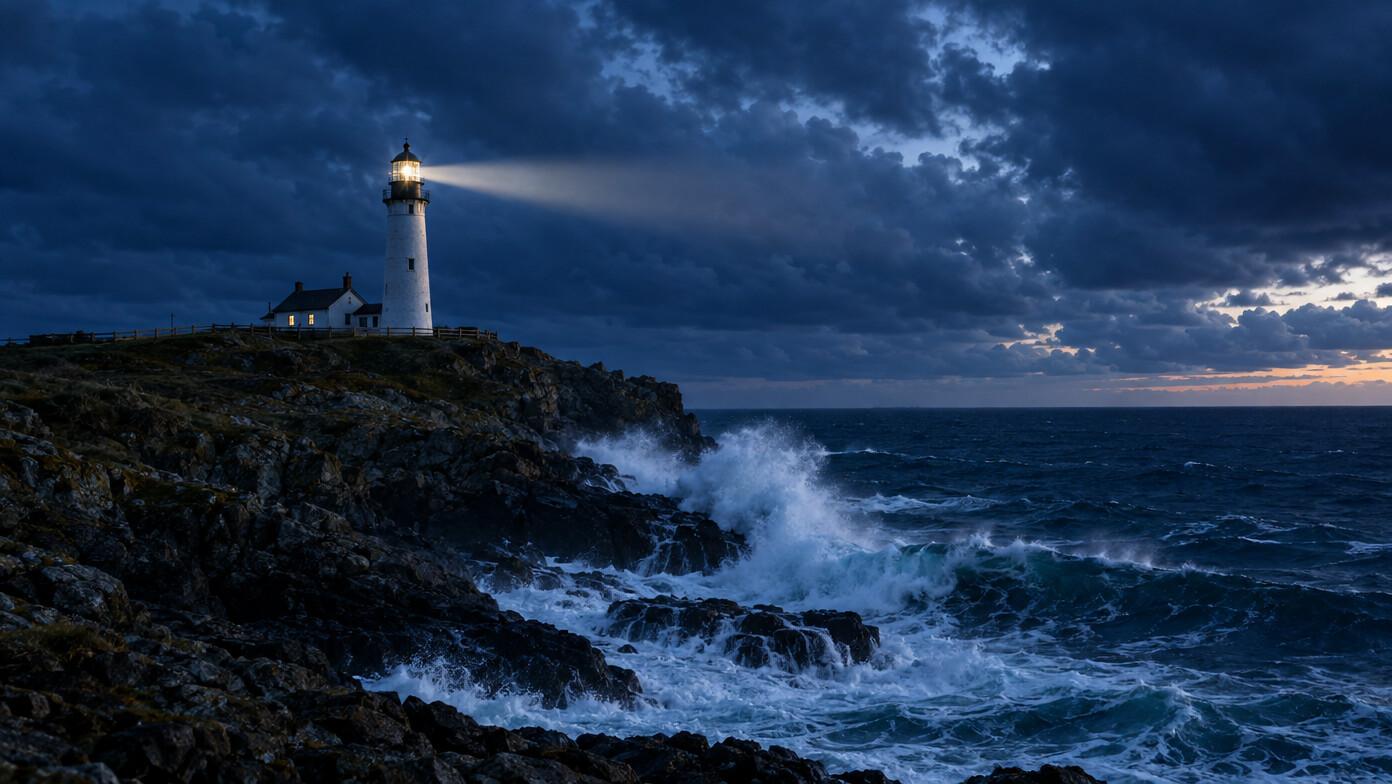
Slow cinematic push-in toward the lighthouse as big waves crash against the rocks and spray drifts across the frame, the beam sweeping through the low clouds. Roaring surf and gusting wind.
原生同步聲音
描述場景裡的聲音,片段生成時就會帶上。這裡一列蒸汽火車鳴著汽笛駛出車站,活塞嘶嘶作響、車輪匡噹,列車長高聲呼喊,全都與畫面同步。
A vintage steam train pulls out of a small mountain station: the whistle blows, pistons hiss, wheels clatter over the rail joints, and the conductor on the platform waves and calls "All aboard!" Puffs of white steam in golden afternoon light.
電影級動態與物理效果
海崖上,一條紅色絲巾被一陣風吹起,翻捲扭動,接著掙脫飛出,飄向海面,陽光透過絲巾灑下。描述作用在主體上的力和鏡頭的移動,Grok Imagine Video 1.5 就會把它演繹出來。
A long red silk scarf is caught by a strong gust on a windy sea cliff, rippling, twisting and snapping in the air before it slips free and tumbles away over the waves; the camera follows it in slow motion, late-afternoon sun shining through the fabric. Wind roaring and fabric flapping.
快速生成
在我們的測試中,5 秒 720p 片段花了 52 到 83 秒生成,例如這隻在紅花間穿梭的蜂鳥。速度快到一次就能把一個點子試上好幾個版本。
A hummingbird hovers in front of a red trumpet flower in a sunlit garden, wings a blur, then darts away; shallow depth of field, bright summer light. The buzz of its wings and birdsong.
最長 15 秒的片段
以 1 秒為單位選擇長度,從 1 秒的循環到 15 秒的長鏡頭都可以。這段連續空拍在日出時掠過雲霧繚繞的梯田,一路沿著河流飛到山下的村莊。
One continuous aerial shot gliding low over misty rice terraces at sunrise, following a winding river down the valley toward a small village with wooden houses and rising cooking smoke. Gentle wind and distant birds.
Grok Imagine Video 1.5 適合誰
不用久等、有聲音的快速短片。
社群創作者
把一個點子或一張照片變成有聲短片,適合發 Reels 和限時動態。
攝影師
替靜態照片加上動態:水流、天空、光線和緩慢的運鏡。
行銷人員
一分鐘內做出廣告概念的動態版本,在正式製作前反覆迭代。
剛入門的新手
免費點數就能用,是學習 AI 影片的理想入門模型。
Grok Imagine Video 1.5 vs Veo 3.1 vs Kling 3.0
| 項目 | Grok Imagine Video 1.5 | Veo 3.1 | Kling 3.0 |
|---|---|---|---|
| 開發商 | xAI | 快手 | |
| 輸入 | 文字、首格 | 文字、首格、最多 3 張參考圖 | 文字、首格 |
| 解析度 | 480p、720p、1080p | 720p、1080p、4K | 720p、1080p、4K |
| 片段長度 | 1–15 秒 | 4–8 秒 | 3–15 秒 |
| 畫面比例 | 16:9、9:16、3:2、2:3、1:1 | 16:9、9:16 | 16:9、9:16、1:1 |
| 聲音 | 原生 | 原生 | 原生 |
| 誰能使用 | 免費及付費方案 | 付費方案 | 免費及付費方案 |
規格和可用性以 MaxH3 上提供的為準。
Grok Imagine Video 1.5 的突出之處
- 1 到 15 秒任意長度: 同一個模型既能做短循環,也能做長鏡頭,支援五種畫面比例,包括 2:3 和 3:2。
- 自帶聲音: 每個片段都帶有與畫面一起生成的音訊,從環境聲到台詞都有。
- 免費點數也能用: 不需訂閱就能試用,用免費點數就行。

如何在 MaxH3 上使用 Grok Imagine Video 1.5
開啟 Grok Imagine Video 1.5
Grok Imagine Video 1.5 已經在上方的產生器中選好。選擇文字生影片;想從一張靜態圖開始,就選圖生影片。
描述畫面和聲音
寫出發生了什麼、鏡頭怎麼移動,把對白放進引號。如果從一張圖片開始,就加入首格。
生成並下載
選擇 1 到 15 秒、480p、720p 或 1080p 和畫面比例,然後按下箭頭按鈕。片段會在你的工作台開啟,可直接下載為 MP4。
MaxH3 上更多 AI 影片模型
常見問題

用 Grok Imagine Video 1.5 體驗快速、有聲的影片
從一則提示詞或一張照片開始,用免費點數在大約一分鐘內得到 1–15 秒的有聲片段。