Grok Imagine Video 1.5 AI 视频生成器
MaxH3 上的 xAI Grok Imagine Video 1.5 能把一条提示词或一张静态图变成 1–15 秒、声画同步的视频,支持 480p、720p 或 1080p,用免费积分就能生成。

Grok Imagine Video 1.5 的核心能力
- 图生视频: 让静态图动起来,同时保留原有的构图和光线。
- 原生同步声音: 汽笛、脚步和人声与画面一起生成。
- 电影级运动与物理效果: 布料、水和风,都按应有的方式运动。
- 快速生成: 5 秒 720p 视频大约一分钟出片。
- 最长 15 秒的视频: 1 到 15 秒任选,拍成一个连续镜头。
图生视频
上传一张照片并描述动作。这张蓝调时刻的灯塔照片变成了一个缓慢推近的镜头:海浪拍打礁石,光束扫过云层,而原图的构图和色彩都保持不变。
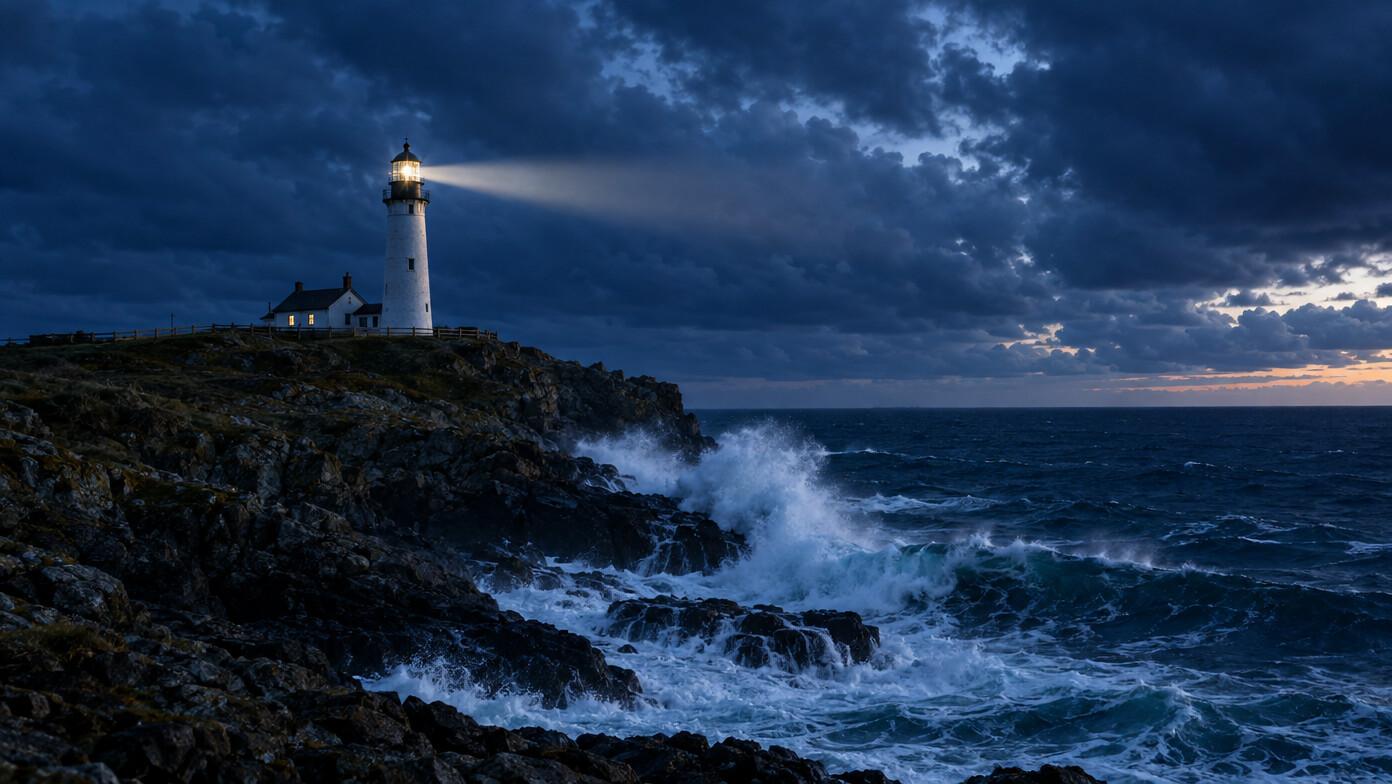
Slow cinematic push-in toward the lighthouse as big waves crash against the rocks and spray drifts across the frame, the beam sweeping through the low clouds. Roaring surf and gusting wind.
原生同步声音
描述场景里的声音,视频生成时就会带上。这里一列蒸汽火车鸣着汽笛驶出车站,活塞嘶嘶作响、车轮哐当,列车员高声吆喝,全都与画面同步。
A vintage steam train pulls out of a small mountain station: the whistle blows, pistons hiss, wheels clatter over the rail joints, and the conductor on the platform waves and calls "All aboard!" Puffs of white steam in golden afternoon light.
电影级运动与物理效果
海崖上,一条红色丝巾被一阵风吹起,翻卷扭动,随后挣脱飞出,飘向海面,阳光透过丝巾洒下来。描述作用在主体上的力和镜头的运动,Grok Imagine Video 1.5 就会把它演绎出来。
A long red silk scarf is caught by a strong gust on a windy sea cliff, rippling, twisting and snapping in the air before it slips free and tumbles away over the waves; the camera follows it in slow motion, late-afternoon sun shining through the fabric. Wind roaring and fabric flapping.
快速生成
在我们的测试中,5 秒 720p 视频用了 52 到 83 秒生成,比如这只在红花间穿梭的蜂鸟。速度快到一次就能把一个想法试上好几个版本。
A hummingbird hovers in front of a red trumpet flower in a sunlit garden, wings a blur, then darts away; shallow depth of field, bright summer light. The buzz of its wings and birdsong.
最长 15 秒的视频
以 1 秒为单位选择时长,从 1 秒的循环到 15 秒的长镜头都可以。这段连续航拍在日出时掠过云雾缭绕的梯田,一路沿着河流飞到山下的村庄。
One continuous aerial shot gliding low over misty rice terraces at sunrise, following a winding river down the valley toward a small village with wooden houses and rising cooking smoke. Gentle wind and distant birds.
Grok Imagine Video 1.5 适合谁
无需久等、带声音的快速短视频。
社媒创作者
把一个想法或一张照片变成带声音的短视频,适合发 Reels 和快拍。
摄影师
给静态照片加上动态:水流、天空、光线和缓慢的运镜。
营销人员
一分钟内做出广告创意的动态版本,在正式制作前反复迭代。
刚入门的新手
免费积分就能用,是学习 AI 视频的理想入门模型。
Grok Imagine Video 1.5 vs Veo 3.1 vs Kling 3.0
| 对比项 | Grok Imagine Video 1.5 | Veo 3.1 | Kling 3.0 |
|---|---|---|---|
| 开发方 | xAI | 快手 | |
| 输入 | 文字、首帧 | 文字、首帧、最多 3 张参考图 | 文字、首帧 |
| 分辨率 | 480p、720p、1080p | 720p、1080p、4K | 720p、1080p、4K |
| 视频时长 | 1–15 秒 | 4–8 秒 | 3–15 秒 |
| 画面比例 | 16:9、9:16、3:2、2:3、1:1 | 16:9、9:16 | 16:9、9:16、1:1 |
| 声音 | 原生 | 原生 | 原生 |
| 谁能用 | 免费及付费套餐 | 付费套餐 | 免费及付费套餐 |
规格和可用性以 MaxH3 上提供的为准。
Grok Imagine Video 1.5 的突出优势
- 1 到 15 秒任意时长: 同一个模型既能做短循环,也能做长镜头,支持五种画面比例,包括 2:3 和 3:2。
- 自带声音: 每段视频都带有与画面一起生成的音频,从环境声到台词都有。
- 免费积分也能用: 无需订阅即可试用,用免费积分就行。

如何在 MaxH3 上使用 Grok Imagine Video 1.5
打开 Grok Imagine Video 1.5
上方生成器里已经选好了 Grok Imagine Video 1.5。选择文生视频;想从一张静态图开始,就选图生视频。
描述画面和声音
写下发生了什么、镜头怎么运动,把对白放进引号里。如果从一张图片开始,就添加首帧。
生成并下载
选择 1 到 15 秒、480p、720p 或 1080p 和画面比例,然后点击箭头按钮。视频会在你的工作台里打开,可直接下载为 MP4。
MaxH3 上的更多 AI 视频模型
常见问题

用 Grok Imagine Video 1.5 体验快速、带声音的视频
从一条提示词或一张照片开始,用免费积分在大约一分钟内得到 1–15 秒带声音的视频。