Google Veo 3.1
Veo 3.1 は、書かれたシーンを、セリフと効果音がすでに同期した映画的な動画に変えます。開始画像と終了画像を渡せばその間の動きを埋め、途中で切れてしまったクリップは延長できます。
Veo 3.1 の主な機能
素材から動画へ
参照画像は、文章が苦手なことをきっちり決めてくれます——特定の顔、特定の製品の質感、ある部屋の光の正確な重さ。Veo 3.1 は最大3枚を受け取り、プロンプトが動きを進めるあいだ、その中身をクリップ全体で保ち続けます。カラーグレーディングを言葉で説明するには、4回書き直すことになる一文が要ります。静止画を渡すなら、アップロード1回で済みます。
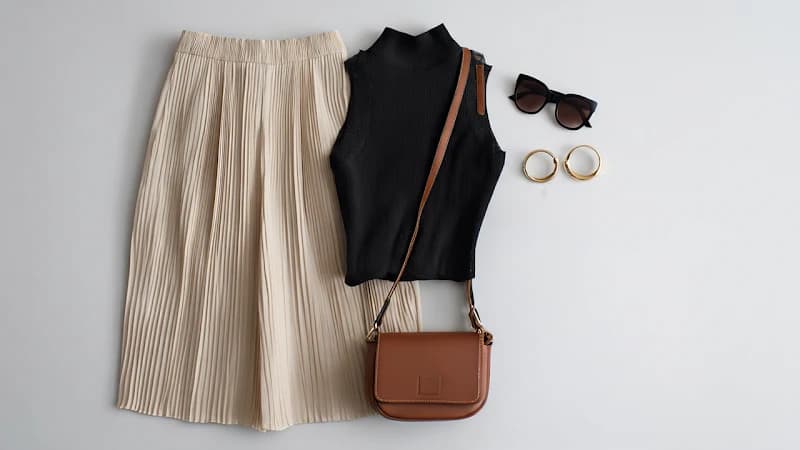
入力画像 1
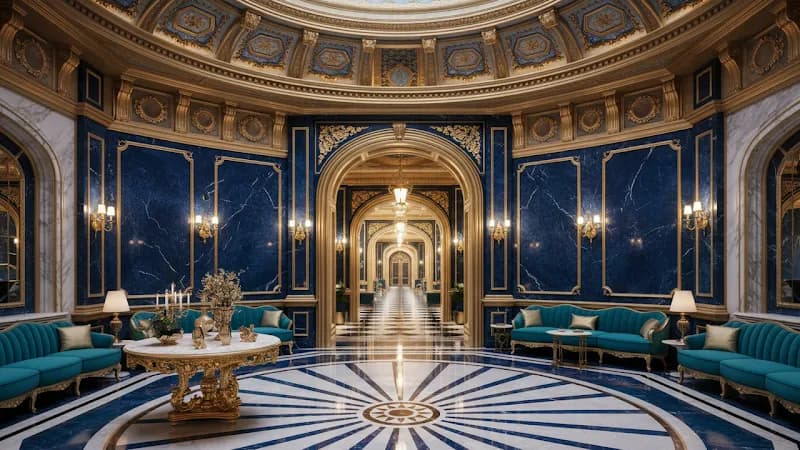
入力画像 2
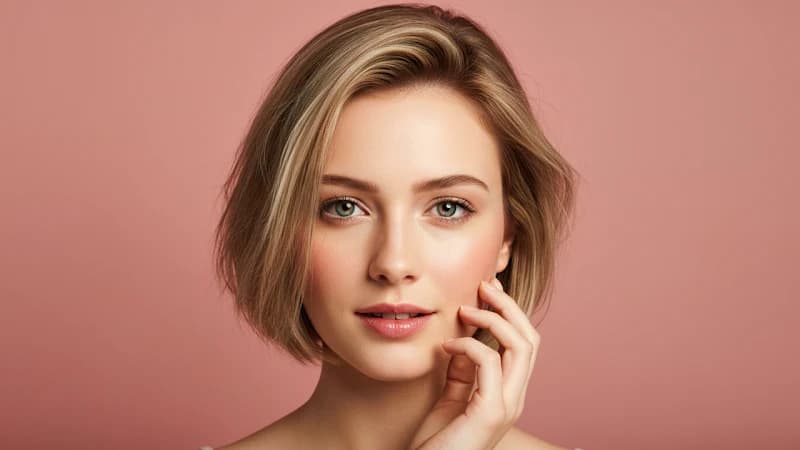
入力画像 3
Prompt:
Close up shot of woman with sunglasses on top of her head, gold hood earrings, is walking in the interior, she is lost and asks where everyone is and what's going on.
シーン延長
1回の生成は8秒です。必要だった瞬間が9秒目に来てしまったとき、かつての答えは「全部生成し直して、2回目が合っていることを祈る」でした。Veo 3.1 は最後のフレームを起点にして続きを作ります——カメラは動いていたとおりに動き続け、光は変わらず、音も無音から始まり直しません。何本かつなげば8秒の上限をゆうに超えられ、継ぎ目で切り詰める必要もありません。
入力動画
Prompt 1: Graceful dancer is slowly dancing to classical music.
Prompt 2: A male dancer comes in, gracefully dancing with the woman as classical music plays.
Prompt 3: More dancers show up on the stage.
Prompt 4: The classical music continues, and the dancers continue to dance.
出力動画
フレームから動画へ
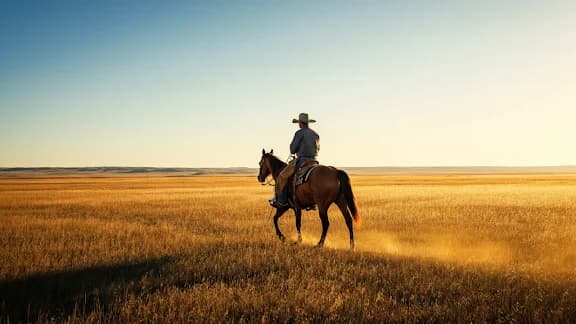
開始がどう見えるか、終了がどう見えるかは、もう分かっているはずです。Veo 3.1 はその間——カメラの動き、タイミング、下に流れる音——を担当します。モデル任せではなく特定の動きが欲しければ、プロンプトでその動きを指定できます。両端があなたの選んだ画像に固定されているので、結果はトリミングなしでタイムラインに収まります。
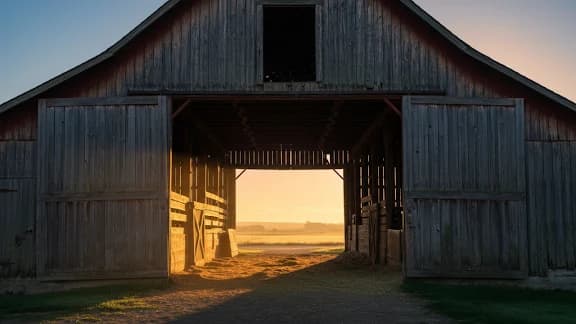
最初のフレーム
最後のフレーム
Prompt:
Camera soars through the barn to the cowboy riding away.
出力動画
同じキャラクターを、クリップをまたいで
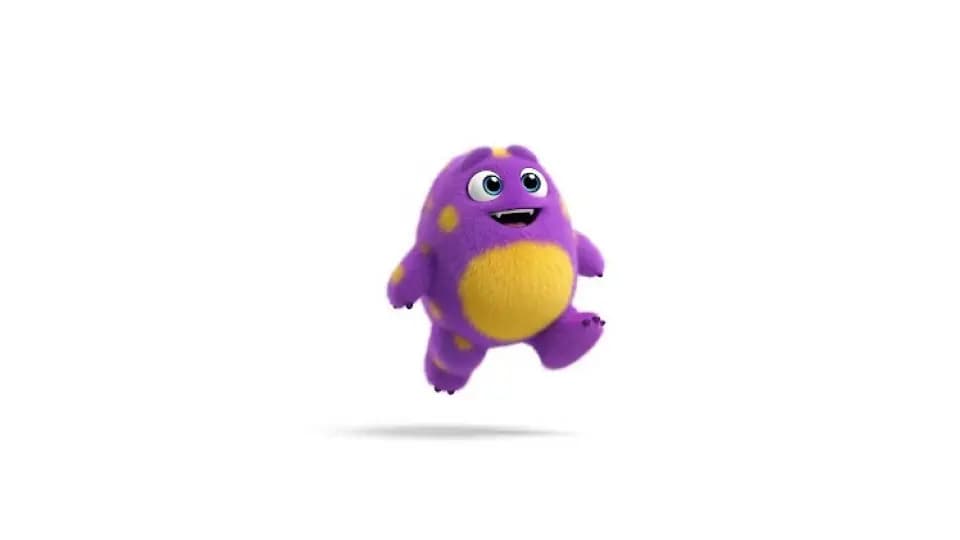
来週、別の舞台で、最初とはまったく共通点のないプロンプトから、同じ人物を呼び戻せます。以前使った参照画像——あるいは既に作ったクリップから抜いた1フレーム——を Veo 3.1 に渡せば、顔も髪も衣装も一緒に戻ってきます。それ以外はすべて自由に変えられます。新しい場所、新しい光、新しい機位、新しい動き。8本、10本と生成をまたいで同一性を保てれば、それはもう「キャスト」です。短いクリップが積み上がって何かになり始めるのは、そこからです。
入力画像
Prompt: a monster walking toward the camera
出力動画
Prompt: a cute monster dancing
出力動画
Prompt: a cute monster swimming underwater
出力動画
Prompt: a cute monster walking in a candy wonderland
縦位置で撮り、4K で仕上げる
Veo 3.1 は横位置を切り出すのではなく 9:16 をネイティブに生成するので、縦の尺は構図を丸ごと保ち、左右で大事なものが削られません。解像度は 4K まで。ストーリー投稿ではあまり意味がありませんが、大画面に載るもの、あるいはもう一度グレーディングを通すものには大きく効いてきます。あとから両方を直すのではなく、生成する前に形とサイズを決めてください。
映像と一緒に出てくる音
セリフ・環境音・効果音は、あとから重ねるのではなくフレームと並行して生成されます。だから閉まる扉は、閉まるその瞬間に閉まる音がします。Veo 3.1 はこれを参照画像・最初と最後のフレーム・延長の各経路にも広げたので、静止画から組み立てたクリップも無音ではなく音付きで返ってきます。ごく短い断片の発話は依然として粗いところで——Google 自身もそう言っています——ただし環境音と効果音は、たいていそのまま公開できる水準です。
Veo 3.1 の各モデルを比較
| 項目 | Veo 3.1 | Veo 3.1 Fast | Veo 3.1 Lite |
|---|---|---|---|
| 向いている用途 | 最高品質、そのまま納品できる動画 | 低コストでより速い生成 | 最も安いドラフトと大量生成 |
| 入力方式 | テキスト、画像、参照画像 | テキスト、画像、参照画像 | テキストと画像 |
| 参照画像 | 対応 | 対応 | 非対応 |
| ネイティブ音声 | 内蔵——セリフ・効果音・環境音 | 内蔵——セリフ・効果音・環境音 | 内蔵——セリフ・効果音・環境音 |
| 出力 | 最大 4K、4〜8秒のクリップ | 最大 4K、4〜8秒のクリップ | 最大 4K、4〜8秒のクリップ |
| 画質 | 最高 | 高い | 良好 |
| 速度 | 標準 | より速い | 最速 |
| 相対コスト | 標準 | 低め | 最安 |
| 選ぶべき場面 | 最も作り込んだ、クライアント提出可能な仕上がりが要るとき | 日常的なクリップで速さとコストを抑えたいとき | 素早く回しているとき、あるいは量産しているとき |
はじめかた
Veo 3.1 での動画生成手順
被写体・動作・カメラの動きを書きます。顔や製品、ルックを固定したいときは参照画像を足してください。
1回の生成で音声付き8秒。足りなければ最後のフレームから延長し、MP4 をダウンロードしてください。
最初のクリップを作ってみませんか?
YouTube で見る AI動画モデル Google Veo 3.1
Veo 3.1 fully tested
AI Search
Google Veo 3.1 is INSANE - Full Tutorial
Roboverse
The New Google VEO 3.1 Tested and Explained: Create Ultra-Realistic AI Videos Fast!
AI Edge Mastery
Google Flow | Veo 3.1 Tutorial & Real Test Results
AI2Play
Master Google Veo 3.1: Mind-Blowing AI Video Results (Full Guide)
Invideo for Filmmaking
How To Use Google VEO 3.1 | Create Realistic AI Videos Step-by-step (Full Tutorial)
BIG JOHNAB
Ultimate VEO 3.1 Update EXPLAINED: How To Use Google Veo-3 For Beginners
AI Master
How I Use VEO 3.1 To Create Viral Videos In 9 Minutes
Nicky Saunders
X で見る AI動画モデル Google Veo 3.1
Will Smith in Veo 3.1 pic.twitter.com/SuK9jky3NW
— AI Search (@aisearchio) October 15, 2025
Veo is getting a major upgrade. 🚀
— Google DeepMind (@GoogleDeepMind) October 15, 2025
We’re rolling out Veo 3.1, our updated video generation model, alongside improved creative controls for filmmakers, storytellers, and developers - many of them with audio. 🧵 pic.twitter.com/YQVRxwj7hk
Ok, Google.
— Koldo Huici (@koldo2k) October 15, 2025
Let’s put VEO 3.1 to the test.
Better prompt adherence and smoother visuals in text-to-video ⚡
Prompts 👇 pic.twitter.com/mBvgnxDDB9
The Good News:
— Alex Patrascu (@maxescu) October 15, 2025
Veo 3.1 is available in Google Flow!
The Bad News:
It's a minor, but significant upgrade pic.twitter.com/BYUxu0dAmU
Veo 3.1 + Nano Banana is insane 🤯
— PJ Ace (@PJaccetturo) October 15, 2025
Google’s new models let us make million-dollar looking ads for brands like Wander.
Copy our entire process for making this ad below 👇🧵pic.twitter.com/HL2TIzPVnY
Veo 3.1
— Tatiana Tsiguleva (@ciguleva) October 15, 2025
I2V tests.
Overall, it's really good!
I love the sounds a lot. pic.twitter.com/fyZ5bbnfSH
Meet Veo 3.1 👋
— Google AI (@GoogleAI) October 17, 2025
With Veo 3.1, you can generate videos with richer audio, better narrative control, and enhanced realism. This new update also comes with a suite of additional features built for creative control.
Including the ability to:
— Extend your videos to make them longer… pic.twitter.com/WMH9TQH0w5
Veo 3 is the state-of-the-art in video models. Veo 3.1 is our new big upgrade with enhanced realism, richer audio, scene extension, better narrative control, more precise editing capabilities & much more. Enjoy creating with it at https://t.co/QgTpxTKAOi and in the @GeminiApp ! https://t.co/kCoE8meIb6
— Demis Hassabis (@demishassabis) October 15, 2025
THE PUMPKIN MURDERERS 🎃
— Travis Davids (@MrDavids1) October 22, 2025
Veo 3.1 extend feature is actually really good! It was extended from a single frame to 43 seconds long. Besides midjourney, Google has managed to make extensions completely seamlessly without jarring visual indications when an extensions occurs. However,… pic.twitter.com/CuU5Y23yAA
Veo3.1 → Edit Feature.
— Rory Flynn (@Ror_Fly) October 15, 2025
Tested it with a more complex visual.
Some misses...but still impressive.
PROCESS:
1. Generate Initial Video
2. Select the "pencil" icon.
3. Add edits + generate.
INITIAL PROMPT:
A silver-haired woman dances with precision and intensity inside a dimly… pic.twitter.com/yfZr4VhNAc
Today, Veo 3.1 Ingredients to Video is getting more expressive + portrait mode has arrived (we heard you!)
— Sundar Pichai (@sundarpichai) January 13, 2026
You can now create vertical clips with livelier movement and better control directly in the @Geminiapp, @YouTube & Google Vids.
All this plus state-of-the-art upscaling to… pic.twitter.com/vCvGEelldS
Google DeepMind Veo 3.1 is something else, social media is cooked forever.
— AshutoshShrivastava (@ai_for_success) October 9, 2025
This video is claimed to be created using Veo 3.1, and I’m adding a screenshot in the comments as proof.
Veo 3.1 generates 8-second videos by default, supports both 9:16 and 16:9 formats, and delivers… https://t.co/mknPB43VXf pic.twitter.com/GPfIBmZQhe
Google has updated its Veo 3.1 AI video model with a stronger Ingredients to Video workflow.
— Rohan Paul (@rohanpaul_ai) January 13, 2026
Ingredients just means the input “parts” you give the model up front, usually a subject image, a background image, and a style or look reference.
Veo uses those images as anchors while… https://t.co/PIJeGNj3Tp pic.twitter.com/yN5uZGlbiE
Tested @FlowbyGoogle's Veo 3.1 + new controls: game-changer!
— SD | AI Animation Storyteller (@SDXLHQ) November 6, 2025
From "prompt-and-pray" to interactive director suite. Insane accuracy & detail. Ends random generations; build scenes layer-by-layer like an editor.
All UI features in demo video attached👇#veo31 #GoogleAI #AIart pic.twitter.com/Zhd8j2pA5n
🥵Google's VEO 3.1 video generation model is set for imminent release on Gemini and Vertex AI! 🎬 Get ready for:
— Times Of Cinema (@Times_of_Cinema) October 15, 2025
🔹 Longer clips (potential 30 seconds!)
🔹 Refined audio-visual quality
This launch is poised to significantly advance generative media for creators and enterprise… pic.twitter.com/hFfPRa3cFv
The Official Release has finally dropped! Veo-3.1 is here!
— Theoretically Media (@TheoMediaAI) October 15, 2025
After a week of biting my tongue at the "leaked specs" we can finally start putting this update through it's paces!
3.1's video model enhancements are one thing, but the real sauce here is in the new features!
(more) pic.twitter.com/Yo8Ke3fKA4
Updates to Veo 3.1 📹 in the Gemini API and AI Studio:
— Logan Kilpatrick (@OfficialLoganK) January 13, 2026
- We now support upsampling to 1080p and 4K
- Improved ingredients (image reference) to video consistency
- Vertical video support for ingredients to video
So much Veo progress in the last few months, lots to build : )
We’re setting a new standard for AI video creation at work.
— Google Workspace (@GoogleWorkspace) October 15, 2025
The new Veo 3.1 model in Google Vids gives you higher quality videos with richer audio, more narrative control, & enhanced realism — helping you produce videos that tell your story beautifully. https://t.co/de2POcj4sQ
Exclusive: First real samples of Veo 3.1 generated videos - TestingCatalog https://t.co/xk1sxzsG4h
— audai (@audaiuk) October 11, 2025
Google's Veo-3.1 revolutionizes AI video with precise frame controls and ingredient blending. Tip: Use "ingredients" in prompts like "Combine [char img] with [loc] for dynamic scenes." https://t.co/0atztXSU5n #AIVideo #NewAIModels #GlobalAI
— PromptNinja (@ninja_prompt) October 16, 2025
よくある質問
MaxH3 で Veo 3.1 を試す
無料クレジット付き、カード登録不要。参照画像、最初と最後のフレーム指定、そして映像と一緒に出てくる音——すべて同じ場所で。
無料生成にはウォーターマークが入ります。クリーンな書き出しにはアップグレードを。