Google Veo 3.1
Veo 3.1은 글로 쓴 장면을 대사와 효과음이 이미 맞물린 시네마틱 영상으로 바꿉니다. 시작 이미지와 끝 이미지를 주면 그 사이 움직임을 채우고, 너무 일찍 끊긴 클립은 이어서 늘릴 수 있습니다.
Veo 3.1의 핵심 기능
- 재료에서 영상으로: 레퍼런스 이미지가 한 글자 쓰기 전에 피사체를 못 박습니다.
- 장면 확장: 처음부터 다시 하지 말고 마지막 프레임에서 이어가세요.
- 프레임에서 영상으로: 여는 이미지와 닫는 이미지를 정하면 그 사이 움직임이 나옵니다.
- 인물 일관성: 같은 사람이, 클립을 넘어서도 프롬프트를 넘어서도.
- 세로와 4K: 네이티브 9:16, 해상도는 4K까지.
- 같은 패스에서 나오는 사운드: 대사와 효과음이 화면과 함께 옵니다. 나중이 아니라.
재료에서 영상으로
레퍼런스 이미지는 글이 잘 못 하는 것을 정확히 붙잡아 둡니다. 특정한 얼굴, 특정 제품의 마감, 어떤 방에 깔린 빛의 정확한 무게 같은 것들이요. Veo 3.1은 최대 세 장을 받아, 프롬프트가 동작을 끌고 가는 동안 그 안의 내용을 클립 내내 붙들어 둡니다. 컬러 그레이딩을 말로 설명하려면 네 번은 고쳐 쓸 문장이 필요하지만, 스틸 한 장을 건네는 데는 업로드 한 번이면 됩니다.
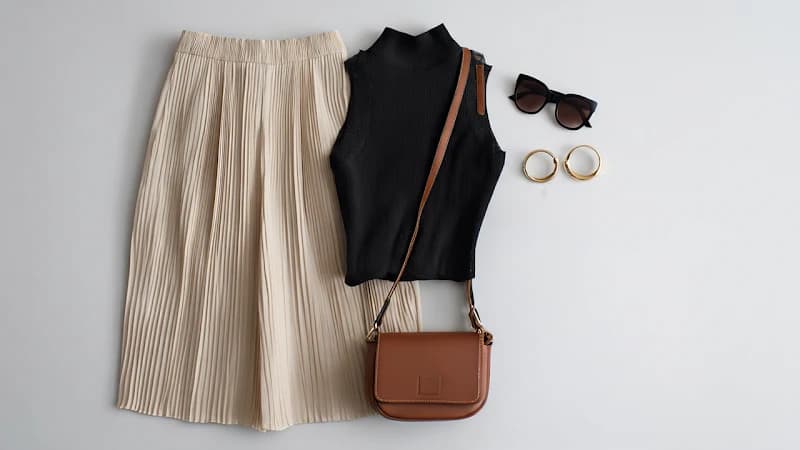
입력 이미지 1
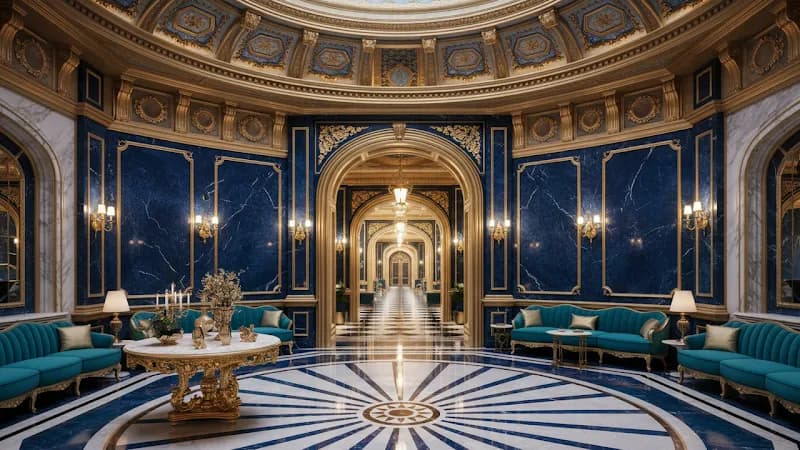
입력 이미지 2
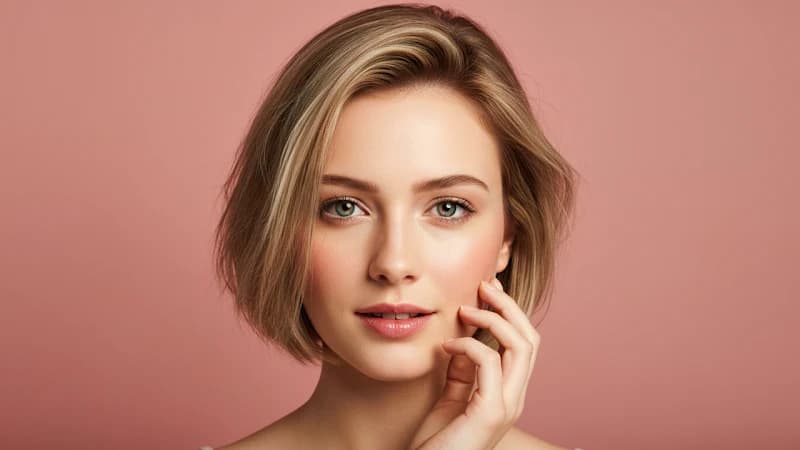
입력 이미지 3
Prompt:
Close up shot of woman with sunglasses on top of her head, gold hood earrings, is walking in the interior, she is lost and asks where everyone is and what's going on.
장면 확장
한 번의 생성은 8초입니다. 필요한 순간이 9초에 걸리면, 예전 해법은 전부 다시 생성하고 두 번째 시도가 맞아떨어지길 바라는 것이었죠. Veo 3.1은 마지막 프레임을 출발점으로 삼아 이어갑니다. 카메라는 움직이던 대로 계속 움직이고, 조명은 그대로이며, 사운드는 무음에서 다시 시작하지 않습니다. 몇 번 이어 붙이면 8초 천장을 훌쩍 넘기면서도 이음매에서 잘라낼 것이 없습니다.
입력 영상
Prompt 1: Graceful dancer is slowly dancing to classical music.
Prompt 2: A male dancer comes in, gracefully dancing with the woman as classical music plays.
Prompt 3: More dancers show up on the stage.
Prompt 4: The classical music continues, and the dancers continue to dance.
출력 영상
프레임에서 영상으로
여는 그림이 어떤지, 닫는 그림이 어떤지는 이미 알고 계실 겁니다. Veo 3.1은 그 사이 — 카메라 무빙, 타이밍, 아래 깔리는 사운드 — 를 맡습니다. 모델이 알아서 고르는 대신 특정 무빙을 원한다면 프롬프트에서 그 무빙을 지목하면 됩니다. 양 끝이 직접 고른 이미지에 묶여 있으니 결과물은 다듬지 않아도 타임라인에 그대로 들어갑니다.

첫 프레임
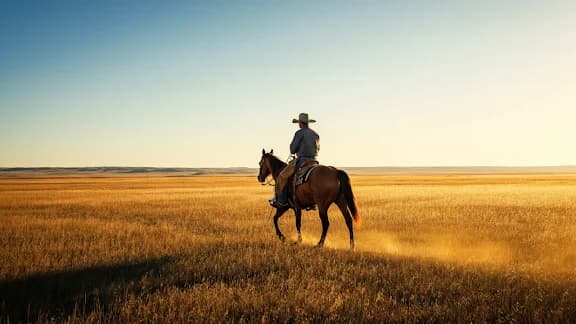
마지막 프레임
Prompt:
Camera soars through the barn to the cowboy riding away.
출력 영상
같은 인물을, 클립을 넘어서
다음 주에 다른 배경에서, 첫 번째와 아무 공통점 없는 프롬프트로 같은 사람을 다시 불러올 수 있습니다. 전에 쓴 레퍼런스 이미지 — 또는 이미 만든 클립에서 뽑은 한 프레임 — 를 Veo 3.1에 주면 얼굴과 머리와 의상이 함께 돌아옵니다. 나머지는 전부 바뀌어도 됩니다. 새 장소, 새 조명, 새 카메라 위치, 새 동작. 여덟 번, 열 번의 생성을 거치며 정체성을 붙들 수 있다면 그건 이미 캐스팅입니다. 짧은 클립들이 무언가로 쌓이기 시작하는 지점이 바로 거기입니다.
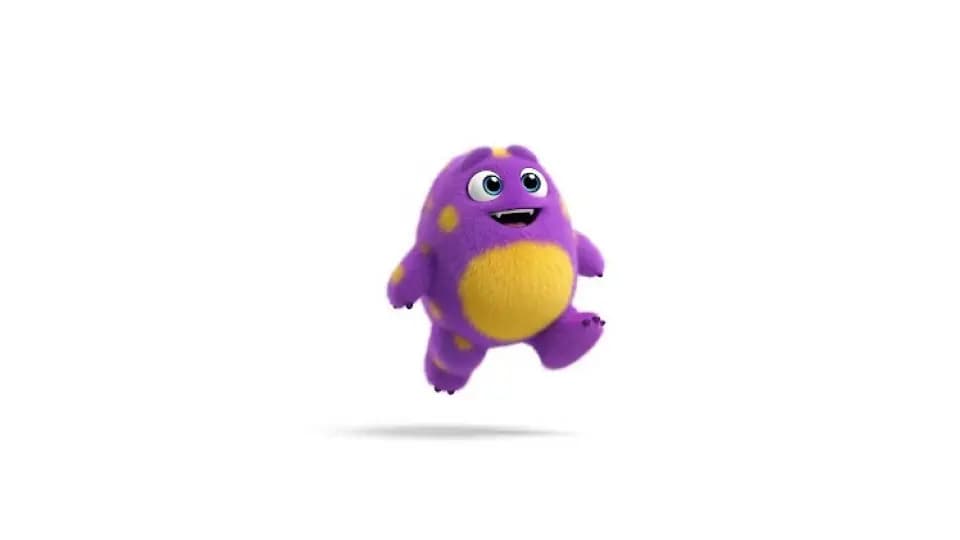
입력 이미지
Prompt: a monster walking toward the camera
출력 영상
Prompt: a cute monster dancing
출력 영상
Prompt: a cute monster swimming underwater
출력 영상
Prompt: a cute monster walking in a candy wonderland
세로로 찍고 4K로 마무리하세요
Veo 3.1은 가로 화면을 잘라내는 대신 9:16을 네이티브로 생성합니다. 그래서 세로 버전은 구도를 통째로 유지하고 양옆에서 중요한 것이 깎여 나가지 않습니다. 해상도는 4K까지 올라가는데, 스토리 게시물에는 별 의미가 없지만 큰 화면에 걸리거나 색보정을 한 번 더 거치는 결과물에는 크게 작용합니다. 나중에 둘 다 고치는 대신 생성 전에 형태와 크기를 정하세요.
화면과 함께 나오는 사운드
대사와 앰비언스, 효과음은 나중에 덧씌우는 것이 아니라 프레임과 나란히 생성됩니다. 그래서 닫히는 문은 닫히는 그 순간에 닫히는 소리가 납니다. Veo 3.1은 이걸 레퍼런스 이미지, 첫/마지막 프레임, 확장 경로에도 넓혀 두어서 스틸로 만든 클립도 무음이 아니라 사운드를 달고 나옵니다. 아주 짧은 조각의 말소리는 여전히 거친 부분입니다 — 구글도 그렇게 말합니다 — 하지만 앰비언스와 효과음은 대개 그대로 내보낼 만합니다.
Veo 3.1 영상 모델 비교
| 항목 | Veo 3.1 | Veo 3.1 Fast | Veo 3.1 Lite |
|---|---|---|---|
| 적합한 용도 | 최고 품질의, 바로 납품 가능한 영상 | 더 낮은 비용으로 더 빠른 생성 | 가장 저렴한 시안과 대량 생산 |
| 입력 방식 | 텍스트, 이미지, 레퍼런스 이미지 | 텍스트, 이미지, 레퍼런스 이미지 | 텍스트와 이미지 |
| 레퍼런스 이미지 | 지원 | 지원 | 미지원 |
| 네이티브 사운드 | 기본 탑재 — 대사, 효과음, 앰비언스 | 기본 탑재 — 대사, 효과음, 앰비언스 | 기본 탑재 — 대사, 효과음, 앰비언스 |
| 출력 | 최대 4K, 4~8초 클립 | 최대 4K, 4~8초 클립 | 최대 4K, 4~8초 클립 |
| 화질 | 최상 | 높음 | 양호 |
| 속도 | 표준 | 더 빠름 | 가장 빠름 |
| 상대 비용 | 표준 | 더 낮음 | 가장 낮음 |
| 이럴 때 최선 | 가장 다듬어진, 클라이언트 제출용 결과가 필요할 때 | 일상적인 클립에서 속도와 비용을 아끼고 싶을 때 | 빠르게 반복하거나 대량으로 뽑을 때 |
시작하기
Veo 3.1로 영상 생성하는 법
Veo 3.1을 선택한 뒤 화면비와 해상도를 정하세요. 세로는 잘라낸 것이 아니라 네이티브로 생성됩니다. 이미지에서 시작하려면 MaxH3 이미지→영상을 이용하세요
피사체와 동작, 카메라 무빙을 적으세요. 얼굴이나 제품, 룩을 고정하려면 레퍼런스 이미지를 더하세요.
한 번의 패스로 사운드가 담긴 8초를 얻습니다. 더 필요하면 마지막 프레임에서 확장한 뒤 MP4를 내려받으세요.
첫 클립을 만들어 볼까요?
AI 영상 모델 Google Veo 3.1에 대한 YouTube 영상
Veo 3.1 fully tested
AI Search
Google Veo 3.1 is INSANE - Full Tutorial
Roboverse
The New Google VEO 3.1 Tested and Explained: Create Ultra-Realistic AI Videos Fast!
AI Edge Mastery
Google Flow | Veo 3.1 Tutorial & Real Test Results
AI2Play
Master Google Veo 3.1: Mind-Blowing AI Video Results (Full Guide)
Invideo for Filmmaking
How To Use Google VEO 3.1 | Create Realistic AI Videos Step-by-step (Full Tutorial)
BIG JOHNAB
Ultimate VEO 3.1 Update EXPLAINED: How To Use Google Veo-3 For Beginners
AI Master
How I Use VEO 3.1 To Create Viral Videos In 9 Minutes
Nicky Saunders
AI 영상 모델 Google Veo 3.1에 대한 X 게시물
Will Smith in Veo 3.1 pic.twitter.com/SuK9jky3NW
— AI Search (@aisearchio) October 15, 2025
Veo is getting a major upgrade. 🚀
— Google DeepMind (@GoogleDeepMind) October 15, 2025
We’re rolling out Veo 3.1, our updated video generation model, alongside improved creative controls for filmmakers, storytellers, and developers - many of them with audio. 🧵 pic.twitter.com/YQVRxwj7hk
Ok, Google.
— Koldo Huici (@koldo2k) October 15, 2025
Let’s put VEO 3.1 to the test.
Better prompt adherence and smoother visuals in text-to-video ⚡
Prompts 👇 pic.twitter.com/mBvgnxDDB9
The Good News:
— Alex Patrascu (@maxescu) October 15, 2025
Veo 3.1 is available in Google Flow!
The Bad News:
It's a minor, but significant upgrade pic.twitter.com/BYUxu0dAmU
Veo 3.1 + Nano Banana is insane 🤯
— PJ Ace (@PJaccetturo) October 15, 2025
Google’s new models let us make million-dollar looking ads for brands like Wander.
Copy our entire process for making this ad below 👇🧵pic.twitter.com/HL2TIzPVnY
Veo 3.1
— Tatiana Tsiguleva (@ciguleva) October 15, 2025
I2V tests.
Overall, it's really good!
I love the sounds a lot. pic.twitter.com/fyZ5bbnfSH
Meet Veo 3.1 👋
— Google AI (@GoogleAI) October 17, 2025
With Veo 3.1, you can generate videos with richer audio, better narrative control, and enhanced realism. This new update also comes with a suite of additional features built for creative control.
Including the ability to:
— Extend your videos to make them longer… pic.twitter.com/WMH9TQH0w5
Veo 3 is the state-of-the-art in video models. Veo 3.1 is our new big upgrade with enhanced realism, richer audio, scene extension, better narrative control, more precise editing capabilities & much more. Enjoy creating with it at https://t.co/QgTpxTKAOi and in the @GeminiApp ! https://t.co/kCoE8meIb6
— Demis Hassabis (@demishassabis) October 15, 2025
THE PUMPKIN MURDERERS 🎃
— Travis Davids (@MrDavids1) October 22, 2025
Veo 3.1 extend feature is actually really good! It was extended from a single frame to 43 seconds long. Besides midjourney, Google has managed to make extensions completely seamlessly without jarring visual indications when an extensions occurs. However,… pic.twitter.com/CuU5Y23yAA
Veo3.1 → Edit Feature.
— Rory Flynn (@Ror_Fly) October 15, 2025
Tested it with a more complex visual.
Some misses...but still impressive.
PROCESS:
1. Generate Initial Video
2. Select the "pencil" icon.
3. Add edits + generate.
INITIAL PROMPT:
A silver-haired woman dances with precision and intensity inside a dimly… pic.twitter.com/yfZr4VhNAc
Today, Veo 3.1 Ingredients to Video is getting more expressive + portrait mode has arrived (we heard you!)
— Sundar Pichai (@sundarpichai) January 13, 2026
You can now create vertical clips with livelier movement and better control directly in the @Geminiapp, @YouTube & Google Vids.
All this plus state-of-the-art upscaling to… pic.twitter.com/vCvGEelldS
Google DeepMind Veo 3.1 is something else, social media is cooked forever.
— AshutoshShrivastava (@ai_for_success) October 9, 2025
This video is claimed to be created using Veo 3.1, and I’m adding a screenshot in the comments as proof.
Veo 3.1 generates 8-second videos by default, supports both 9:16 and 16:9 formats, and delivers… https://t.co/mknPB43VXf pic.twitter.com/GPfIBmZQhe
Google has updated its Veo 3.1 AI video model with a stronger Ingredients to Video workflow.
— Rohan Paul (@rohanpaul_ai) January 13, 2026
Ingredients just means the input “parts” you give the model up front, usually a subject image, a background image, and a style or look reference.
Veo uses those images as anchors while… https://t.co/PIJeGNj3Tp pic.twitter.com/yN5uZGlbiE
Tested @FlowbyGoogle's Veo 3.1 + new controls: game-changer!
— SD | AI Animation Storyteller (@SDXLHQ) November 6, 2025
From "prompt-and-pray" to interactive director suite. Insane accuracy & detail. Ends random generations; build scenes layer-by-layer like an editor.
All UI features in demo video attached👇#veo31 #GoogleAI #AIart pic.twitter.com/Zhd8j2pA5n
🥵Google's VEO 3.1 video generation model is set for imminent release on Gemini and Vertex AI! 🎬 Get ready for:
— Times Of Cinema (@Times_of_Cinema) October 15, 2025
🔹 Longer clips (potential 30 seconds!)
🔹 Refined audio-visual quality
This launch is poised to significantly advance generative media for creators and enterprise… pic.twitter.com/hFfPRa3cFv
The Official Release has finally dropped! Veo-3.1 is here!
— Theoretically Media (@TheoMediaAI) October 15, 2025
After a week of biting my tongue at the "leaked specs" we can finally start putting this update through it's paces!
3.1's video model enhancements are one thing, but the real sauce here is in the new features!
(more) pic.twitter.com/Yo8Ke3fKA4
Updates to Veo 3.1 📹 in the Gemini API and AI Studio:
— Logan Kilpatrick (@OfficialLoganK) January 13, 2026
- We now support upsampling to 1080p and 4K
- Improved ingredients (image reference) to video consistency
- Vertical video support for ingredients to video
So much Veo progress in the last few months, lots to build : )
We’re setting a new standard for AI video creation at work.
— Google Workspace (@GoogleWorkspace) October 15, 2025
The new Veo 3.1 model in Google Vids gives you higher quality videos with richer audio, more narrative control, & enhanced realism — helping you produce videos that tell your story beautifully. https://t.co/de2POcj4sQ
Exclusive: First real samples of Veo 3.1 generated videos - TestingCatalog https://t.co/xk1sxzsG4h
— audai (@audaiuk) October 11, 2025
Google's Veo-3.1 revolutionizes AI video with precise frame controls and ingredient blending. Tip: Use "ingredients" in prompts like "Combine [char img] with [loc] for dynamic scenes." https://t.co/0atztXSU5n #AIVideo #NewAIModels #GlobalAI
— PromptNinja (@ninja_prompt) October 16, 2025
자주 묻는 질문
MaxH3에서 Veo 3.1을 사용해 보세요
무료 크레딧, 카드 등록 불필요. 레퍼런스 이미지, 첫/마지막 프레임 제어, 그리고 화면과 함께 나오는 사운드까지 한곳에서.
무료 생성물에는 워터마크가 들어갑니다. 깨끗하게 내보내려면 업그레이드하세요.