Google Veo 3.1
Veo 3.1 เปลี่ยนฉากที่เขียนไว้เป็นวิดีโอระดับภาพยนตร์ พร้อมบทพูดและเอฟเฟกต์เสียงที่ซิงก์กันอยู่แล้ว ให้ภาพเริ่มต้นและภาพจบแล้วโมเดลจะเติมการเคลื่อนไหวระหว่างกัน หรือต่อความยาวคลิปที่จบเร็วเกินไป
ฟีเจอร์เด่นของ Veo 3.1
- องค์ประกอบเป็นวิดีโอ: ภาพอ้างอิงกำหนดตัวแบบให้ชัดก่อนที่คุณจะเขียนสักคำ
- ต่อขยายฉาก: ต่อจากเฟรมสุดท้ายแทนการเริ่มใหม่ทั้งหมด
- เฟรมเป็นวิดีโอ: กำหนดภาพเปิดและภาพปิด แล้วรับการเคลื่อนไหวระหว่างกลาง
- ความสม่ำเสมอของตัวละคร: คนเดิม คลิปแล้วคลิปเล่า พรอมต์แล้วพรอมต์เล่า
- แนวตั้งและ 4K: 9:16 แบบเนทีฟ และความละเอียดสูงสุด 4K
- เสียงในรอบเดียวกัน: บทพูดและเอฟเฟกต์มาพร้อมภาพ ไม่ใช่ตามมาทีหลัง
องค์ประกอบเป็นวิดีโอ
ภาพอ้างอิงช่วยกำหนดสิ่งที่การบรรยายด้วยคำทำได้ไม่ดี เช่น ใบหน้าที่เจาะจง ผิวสัมผัสของสินค้าชิ้นหนึ่ง หรือน้ำหนักของแสงในห้องอย่างแม่นยำ Veo 3.1 รับได้สูงสุดสามภาพ และรักษาสิ่งที่อยู่ในภาพให้คงที่ตลอดคลิปขณะที่พรอมต์ขับเคลื่อนแอ็กชัน การอธิบายการเกรดสีด้วยคำต้องใช้ประโยคที่คุณจะเขียนใหม่สี่รอบ แต่การส่งภาพนิ่งใช้แค่การอัปโหลดครั้งเดียว
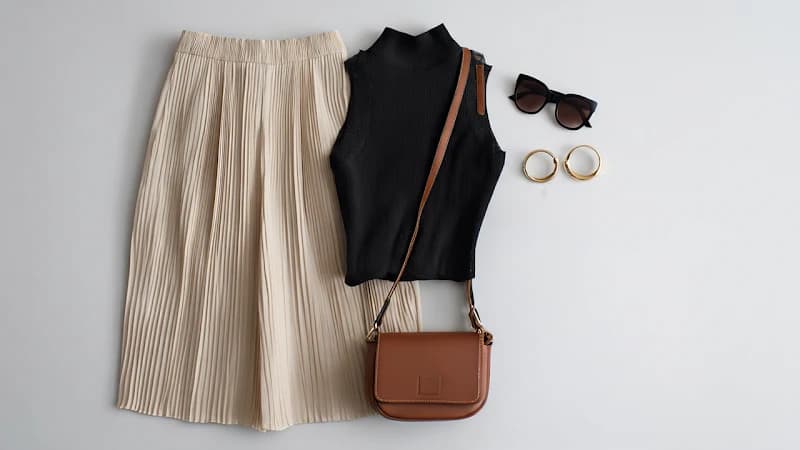
ภาพอินพุต 1
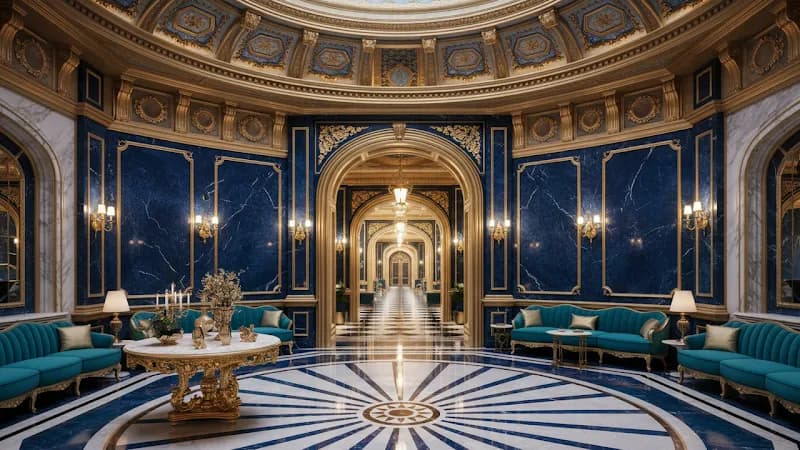
ภาพอินพุต 2
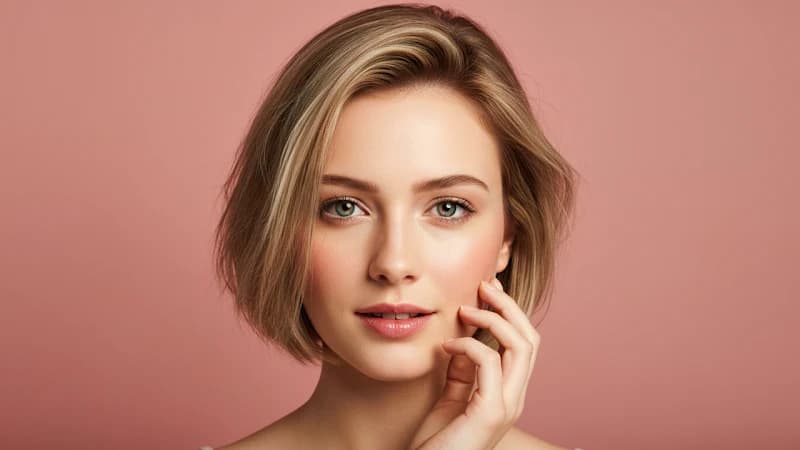
ภาพอินพุต 3
Prompt:
Close up shot of woman with sunglasses on top of her head, gold hood earrings, is walking in the interior, she is lost and asks where everyone is and what's going on.
ต่อขยายฉาก
การสร้างหนึ่งครั้งยาวแปดวินาที เมื่อจังหวะที่คุณต้องการอยู่ที่วินาทีที่เก้า วิธีเดิมคือสร้างใหม่ทั้งหมดแล้วหวังว่าครั้งที่สองจะตรงกัน Veo 3.1 ใช้เฟรมสุดท้ายเป็นจุดเริ่มแล้วไปต่อ กล้องยังเคลื่อนในทิศทางเดิม แสงไม่เปลี่ยน เสียงไม่เริ่มใหม่จากความเงียบ ต่อกันหลายครั้งก็ยาวเกินเพดานแปดวินาทีไปไกล โดยไม่ต้องตัดแต่งรอยต่อ
วิดีโออินพุต
Prompt 1: Graceful dancer is slowly dancing to classical music.
Prompt 2: A male dancer comes in, gracefully dancing with the woman as classical music plays.
Prompt 3: More dancers show up on the stage.
Prompt 4: The classical music continues, and the dancers continue to dance.
วิดีโอผลลัพธ์
เฟรมเป็นวิดีโอ
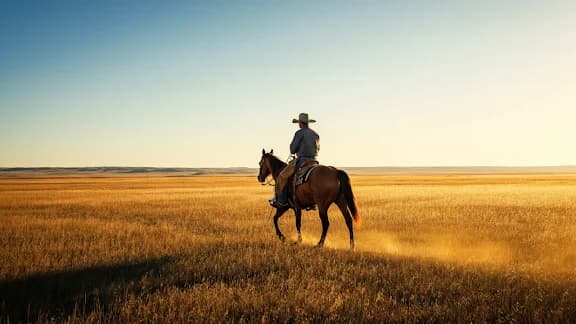
คุณรู้อยู่แล้วว่าฉากเปิดและฉากปิดหน้าตาเป็นอย่างไร Veo 3.1 ทำส่วนที่อยู่ระหว่างกลาง ทั้งการเคลื่อนกล้อง จังหวะเวลา และเสียงประกอบ และคุณระบุการเคลื่อนกล้องในพรอมต์ได้หากต้องการแบบเจาะจงแทนสิ่งที่โมเดลจะเลือกเอง เพราะทั้งสองปลายถูกล็อกไว้กับภาพที่คุณเลือก ผลลัพธ์จึงวางลงในไทม์ไลน์ได้เลยโดยไม่ต้องตัดแต่ง
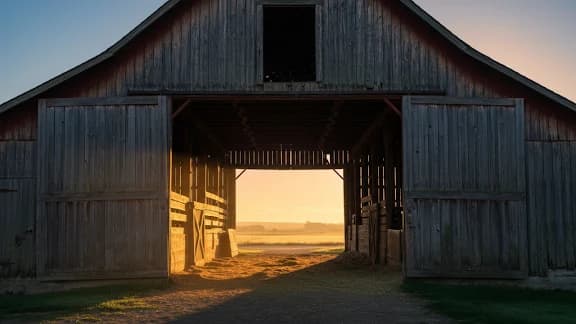
เฟรมแรก
เฟรมสุดท้าย
Prompt:
Camera soars through the barn to the cowboy riding away.
วิดีโอผลลัพธ์
ตัวละครเดิม คลิปแล้วคลิปเล่า
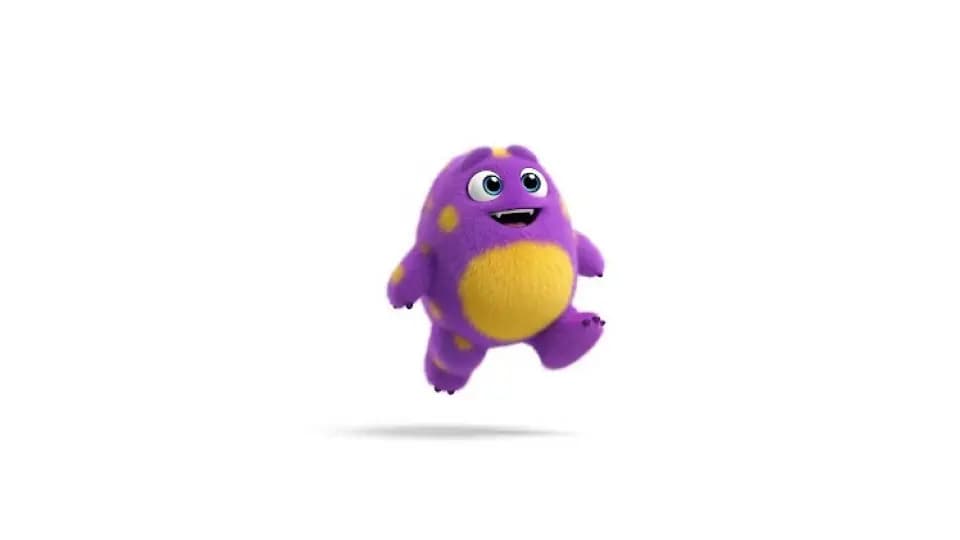
พาคนเดิมกลับมาในสัปดาห์หน้า ในฉากที่ต่างออกไป จากพรอมต์ที่ไม่มีอะไรเหมือนพรอมต์แรกเลย ใส่ภาพอ้างอิงที่คุณใช้ก่อนหน้าให้ Veo 3.1 หรือเฟรมที่ดึงมาจากคลิปที่คุณทำไว้แล้ว แล้วใบหน้า ทรงผม และเครื่องแต่งกายจะกลับมาด้วย ส่วนอย่างอื่นเปลี่ยนได้อิสระ สถานที่ใหม่ แสงใหม่ ตำแหน่งกล้องใหม่ แอ็กชันใหม่ รักษาตัวตนไว้ได้ตลอดแปดถึงสิบการสร้าง คุณก็จะมีนักแสดงประจำ ซึ่งเป็นจุดที่คลิปสั้นๆ เริ่มรวมกันเป็นเรื่องราว
ภาพอินพุต
Prompt: a monster walking toward the camera
วิดีโอผลลัพธ์
Prompt: a cute monster dancing
วิดีโอผลลัพธ์
Prompt: a cute monster swimming underwater
วิดีโอผลลัพธ์
Prompt: a cute monster walking in a candy wonderland
ถ่ายแนวตั้ง จบงานที่ 4K
Veo 3.1 สร้าง 9:16 แบบเนทีฟแทนการครอปจากเฟรมแนวนอน งานตัดแนวตั้งจึงคงองค์ประกอบไว้ครบและไม่มีส่วนสำคัญถูกตัดออกด้านข้าง ความละเอียดสูงสุด 4K ซึ่งไม่ค่อยสำคัญสำหรับโพสต์สตอรี่ แต่สำคัญมากสำหรับงานที่ไปอยู่บนจอใหญ่หรือต้องผ่านการเกรดสีรอบสอง เลือกสัดส่วนและขนาดก่อนสร้าง แทนการแก้ทั้งสองอย่างภายหลัง
เสียงที่มาพร้อมกับภาพ
บทพูด เสียงบรรยากาศ และเอฟเฟกต์ถูกสร้างไปพร้อมกับเฟรม ไม่ได้ถูกวางทับภายหลัง เสียงประตูปิดจึงดังตรงจังหวะที่ประตูปิด Veo 3.1 ขยายความสามารถนี้ไปยังเส้นทางภาพอ้างอิง เฟรมแรกและเฟรมสุดท้าย และการต่อขยายด้วย คลิปที่สร้างจากภาพนิ่งจึงมาพร้อมเสียงแทนที่จะเงียบ เสียงพูดที่เป็นท่อนสั้นมากยังเป็นจุดที่ไม่สมบูรณ์ ซึ่ง Google เองก็ยอมรับ แต่งานเสียงบรรยากาศและเอฟเฟกต์มักเผยแพร่ได้เลยตามที่ได้มา
เปรียบเทียบโมเดลวิดีโอ Veo 3.1
| ฟีเจอร์ | Veo 3.1 | Veo 3.1 Fast | Veo 3.1 Lite |
|---|---|---|---|
| เหมาะที่สุดสำหรับ | วิดีโอคุณภาพสูงสุดที่พร้อมใช้งานจริง | สร้างได้เร็วขึ้นในราคาที่ต่ำลง | งานร่างราคาต่ำที่สุดและผลงานปริมาณมาก |
| โหมดอินพุต | ข้อความ รูปภาพ และภาพอ้างอิง | ข้อความ รูปภาพ และภาพอ้างอิง | ข้อความและรูปภาพ |
| ภาพอ้างอิง | มี | มี | ไม่มี |
| เสียงในตัว | มีในตัว — บทพูด เอฟเฟกต์ และเสียงบรรยากาศ | มีในตัว — บทพูด เอฟเฟกต์ และเสียงบรรยากาศ | มีในตัว — บทพูด เอฟเฟกต์ และเสียงบรรยากาศ |
| ผลลัพธ์ | สูงสุด 4K คลิปยาว 4–8 วินาที | สูงสุด 4K คลิปยาว 4–8 วินาที | สูงสุด 4K คลิปยาว 4–8 วินาที |
| คุณภาพภาพ | สูงสุด | สูง | ดี |
| ความเร็ว | มาตรฐาน | เร็วกว่า | เร็วที่สุด |
| ค่าใช้จ่ายเปรียบเทียบ | มาตรฐาน | ต่ำกว่า | ต่ำที่สุด |
| ตัวเลือกที่ดีที่สุดเมื่อ | คุณต้องการผลลัพธ์ที่เนี้ยบที่สุด พร้อมส่งลูกค้า | คุณต้องการความเร็วและความประหยัดสำหรับคลิปประจำวัน | คุณกำลังปรับแก้อย่างรวดเร็วหรือผลิตปริมาณมาก |
เริ่มต้นใช้งาน
วิธีสร้างวิดีโอด้วย Veo 3.1
เลือก Veo 3.1 แล้วตั้งอัตราส่วนภาพและความละเอียด แนวตั้งสร้างแบบเนทีฟ ไม่ใช่การครอป หรือเริ่มจากรูปภาพด้วย รูปภาพเป็นวิดีโอของ MaxH3
ระบุตัวแบบ แอ็กชัน และการเคลื่อนกล้อง เพิ่มภาพอ้างอิงเพื่อล็อกใบหน้า สินค้า หรือลุค
การสร้างหนึ่งรอบให้คลิปยาวแปดวินาทีพร้อมเสียง ต่อขยายจากเฟรมสุดท้ายหากต้องการยาวขึ้น แล้วดาวน์โหลดไฟล์ MP4
พร้อมสร้างคลิปแรกของคุณหรือยัง
วิดีโอ YouTube เกี่ยวกับโมเดลวิดีโอ AI Google Veo 3.1
Veo 3.1 fully tested
AI Search
Google Veo 3.1 is INSANE - Full Tutorial
Roboverse
The New Google VEO 3.1 Tested and Explained: Create Ultra-Realistic AI Videos Fast!
AI Edge Mastery
Google Flow | Veo 3.1 Tutorial & Real Test Results
AI2Play
Master Google Veo 3.1: Mind-Blowing AI Video Results (Full Guide)
Invideo for Filmmaking
How To Use Google VEO 3.1 | Create Realistic AI Videos Step-by-step (Full Tutorial)
BIG JOHNAB
Ultimate VEO 3.1 Update EXPLAINED: How To Use Google Veo-3 For Beginners
AI Master
How I Use VEO 3.1 To Create Viral Videos In 9 Minutes
Nicky Saunders
โพสต์บน X เกี่ยวกับโมเดลวิดีโอ AI Google Veo 3.1
Will Smith in Veo 3.1 pic.twitter.com/SuK9jky3NW
— AI Search (@aisearchio) October 15, 2025
Veo is getting a major upgrade. 🚀
— Google DeepMind (@GoogleDeepMind) October 15, 2025
We’re rolling out Veo 3.1, our updated video generation model, alongside improved creative controls for filmmakers, storytellers, and developers - many of them with audio. 🧵 pic.twitter.com/YQVRxwj7hk
Ok, Google.
— Koldo Huici (@koldo2k) October 15, 2025
Let’s put VEO 3.1 to the test.
Better prompt adherence and smoother visuals in text-to-video ⚡
Prompts 👇 pic.twitter.com/mBvgnxDDB9
The Good News:
— Alex Patrascu (@maxescu) October 15, 2025
Veo 3.1 is available in Google Flow!
The Bad News:
It's a minor, but significant upgrade pic.twitter.com/BYUxu0dAmU
Veo 3.1 + Nano Banana is insane 🤯
— PJ Ace (@PJaccetturo) October 15, 2025
Google’s new models let us make million-dollar looking ads for brands like Wander.
Copy our entire process for making this ad below 👇🧵pic.twitter.com/HL2TIzPVnY
Veo 3.1
— Tatiana Tsiguleva (@ciguleva) October 15, 2025
I2V tests.
Overall, it's really good!
I love the sounds a lot. pic.twitter.com/fyZ5bbnfSH
Meet Veo 3.1 👋
— Google AI (@GoogleAI) October 17, 2025
With Veo 3.1, you can generate videos with richer audio, better narrative control, and enhanced realism. This new update also comes with a suite of additional features built for creative control.
Including the ability to:
— Extend your videos to make them longer… pic.twitter.com/WMH9TQH0w5
Veo 3 is the state-of-the-art in video models. Veo 3.1 is our new big upgrade with enhanced realism, richer audio, scene extension, better narrative control, more precise editing capabilities & much more. Enjoy creating with it at https://t.co/QgTpxTKAOi and in the @GeminiApp ! https://t.co/kCoE8meIb6
— Demis Hassabis (@demishassabis) October 15, 2025
THE PUMPKIN MURDERERS 🎃
— Travis Davids (@MrDavids1) October 22, 2025
Veo 3.1 extend feature is actually really good! It was extended from a single frame to 43 seconds long. Besides midjourney, Google has managed to make extensions completely seamlessly without jarring visual indications when an extensions occurs. However,… pic.twitter.com/CuU5Y23yAA
Veo3.1 → Edit Feature.
— Rory Flynn (@Ror_Fly) October 15, 2025
Tested it with a more complex visual.
Some misses...but still impressive.
PROCESS:
1. Generate Initial Video
2. Select the "pencil" icon.
3. Add edits + generate.
INITIAL PROMPT:
A silver-haired woman dances with precision and intensity inside a dimly… pic.twitter.com/yfZr4VhNAc
Today, Veo 3.1 Ingredients to Video is getting more expressive + portrait mode has arrived (we heard you!)
— Sundar Pichai (@sundarpichai) January 13, 2026
You can now create vertical clips with livelier movement and better control directly in the @Geminiapp, @YouTube & Google Vids.
All this plus state-of-the-art upscaling to… pic.twitter.com/vCvGEelldS
Google DeepMind Veo 3.1 is something else, social media is cooked forever.
— AshutoshShrivastava (@ai_for_success) October 9, 2025
This video is claimed to be created using Veo 3.1, and I’m adding a screenshot in the comments as proof.
Veo 3.1 generates 8-second videos by default, supports both 9:16 and 16:9 formats, and delivers… https://t.co/mknPB43VXf pic.twitter.com/GPfIBmZQhe
Google has updated its Veo 3.1 AI video model with a stronger Ingredients to Video workflow.
— Rohan Paul (@rohanpaul_ai) January 13, 2026
Ingredients just means the input “parts” you give the model up front, usually a subject image, a background image, and a style or look reference.
Veo uses those images as anchors while… https://t.co/PIJeGNj3Tp pic.twitter.com/yN5uZGlbiE
Tested @FlowbyGoogle's Veo 3.1 + new controls: game-changer!
— SD | AI Animation Storyteller (@SDXLHQ) November 6, 2025
From "prompt-and-pray" to interactive director suite. Insane accuracy & detail. Ends random generations; build scenes layer-by-layer like an editor.
All UI features in demo video attached👇#veo31 #GoogleAI #AIart pic.twitter.com/Zhd8j2pA5n
🥵Google's VEO 3.1 video generation model is set for imminent release on Gemini and Vertex AI! 🎬 Get ready for:
— Times Of Cinema (@Times_of_Cinema) October 15, 2025
🔹 Longer clips (potential 30 seconds!)
🔹 Refined audio-visual quality
This launch is poised to significantly advance generative media for creators and enterprise… pic.twitter.com/hFfPRa3cFv
The Official Release has finally dropped! Veo-3.1 is here!
— Theoretically Media (@TheoMediaAI) October 15, 2025
After a week of biting my tongue at the "leaked specs" we can finally start putting this update through it's paces!
3.1's video model enhancements are one thing, but the real sauce here is in the new features!
(more) pic.twitter.com/Yo8Ke3fKA4
Updates to Veo 3.1 📹 in the Gemini API and AI Studio:
— Logan Kilpatrick (@OfficialLoganK) January 13, 2026
- We now support upsampling to 1080p and 4K
- Improved ingredients (image reference) to video consistency
- Vertical video support for ingredients to video
So much Veo progress in the last few months, lots to build : )
We’re setting a new standard for AI video creation at work.
— Google Workspace (@GoogleWorkspace) October 15, 2025
The new Veo 3.1 model in Google Vids gives you higher quality videos with richer audio, more narrative control, & enhanced realism — helping you produce videos that tell your story beautifully. https://t.co/de2POcj4sQ
Exclusive: First real samples of Veo 3.1 generated videos - TestingCatalog https://t.co/xk1sxzsG4h
— audai (@audaiuk) October 11, 2025
Google's Veo-3.1 revolutionizes AI video with precise frame controls and ingredient blending. Tip: Use "ingredients" in prompts like "Combine [char img] with [loc] for dynamic scenes." https://t.co/0atztXSU5n #AIVideo #NewAIModels #GlobalAI
— PromptNinja (@ninja_prompt) October 16, 2025
คำถามที่พบบ่อย
ลองใช้ Veo 3.1 บน MaxH3
เครดิตฟรี ไม่ต้องใช้บัตร ภาพอ้างอิง การควบคุมเฟรมแรกและเฟรมสุดท้าย และเสียงที่มาพร้อมภาพ ครบในที่เดียว
งานที่สร้างฟรีจะมีลายน้ำ อัปเกรดเพื่อส่งออกแบบไม่มีลายน้ำ